


eBook not opening on your Kindle? EPUB file not supported on your reading app? Or maybe you downloaded an ebook that works perfectly on one device but completely fails on another.
These compatibility issues are extremely common today because different ebook readers support different file formats. Students, readers, authors, publishers, and professionals often struggle to open or read ebooks across multiple devices.
This is where an ebook file converter becomes incredibly useful.
Instead of searching for different apps or downloading complicated software, an ebook converter helps you quickly change one ebook format into another. Whether you want to convert EPUB to MOBI, PDF to EPUB, or AZW3 to TXT, the process becomes simple and beginner-friendly.
In this complete guide, you will learn:
- What an ebook converter is
- Popular ebook formats explained
- Why ebook conversion matters
- How to convert ebooks online step-by-step
- Common conversion problems and solutions
- Tips for better ebook conversion results
By the end of this guide, you will know exactly how to convert ebooks quickly while improving compatibility across all your devices.
What Is an eBook File Converter?
An ebook file converter is a tool that converts one ebook format into another format so the file can work properly across different devices, apps, and ebook readers.
Different ebook platforms support different file types. For example:
- Kindle devices prefer MOBI or AZW3
- Apple Books commonly uses EPUB
- PDFs work on almost all devices
- TXT files are lightweight and simple
An ebook converter helps solve compatibility issues by transforming unsupported files into readable formats.
Common Ebook Formats Supported
Most ebook conversion tools support:
- EPUB
- MOBI
- AZW3
- TXT
- FB2
- DOCX
For example, if your EPUB file does not work on Kindle, you can use an ebook file converter to change it into MOBI or AZW3 format.
This makes reading smoother and avoids frustrating file errors.
Why eBook Conversion Matters
eBook conversion has become essential because modern readers use multiple devices for reading digital content.
A file that works perfectly on one device may fail completely on another.
Why Conversion Is Important
Better Device Compatibility
Different devices support different formats. Conversion ensures your ebook works everywhere.
Improved Reading Experience
The right format improves text scaling, layout, readability, and navigation.
Accessibility Benefits
Converting ebooks allows readers to adjust fonts, themes, and screen sizes more effectively.
Easy File Sharing
Universal formats like PDF and EPUB are easier to distribute across platforms.
Publishing Flexibility
Authors and publishers often convert ebooks into multiple formats to reach wider audiences.
For example:
- Kindle users may need MOBI or AZW3
- Mobile readers often prefer EPUB
- Researchers may use PDF
- Lightweight readers may choose TXT
Using a reliable ebook format converter simplifies all these tasks.
Popular eBook File Formats Explained
Understanding ebook formats helps you choose the best format for your reading needs.
EPUB
EPUB is one of the most popular ebook formats today.
Best For:
- Mobile reading
- Tablets
- Apple Books
- Google Play Books
Advantages:
- Responsive layout
- Adjustable text
- Lightweight
- Wide compatibility
Disadvantages:
- Not fully supported on older Kindle devices
MOBI
MOBI is commonly associated with older Amazon Kindle devices.
Best For:
- Kindle readers
Advantages:
- Good Kindle support
- Simple formatting
Disadvantages:
- Becoming outdated compared to EPUB
AZW3
AZW3 is Amazon’s advanced Kindle ebook format.
Best For:
- Modern Kindle devices
Advantages:
- Better formatting
- Improved typography
- Advanced Kindle support
Disadvantages:
- Limited outside Amazon ecosystem
PDF is widely used for fixed-layout ebooks and documents.
Best For:
- Manuals
- Reports
- Printable documents
Advantages:
- Universal compatibility
- Preserves layout perfectly
Disadvantages:
- Poor responsive reading experience on small screens
TXT
TXT files contain plain text without formatting.
Best For:
- Lightweight reading
- Notes
- Basic text access
Advantages:
- Extremely small file size
- Universal support
Disadvantages:
- No images or advanced formatting
Using a proper ebook format converter helps transform these formats easily based on your reading requirements.
eBook File Converter vs Manual Conversion
Many users try manual methods for ebook conversion, but they often cause formatting issues or compatibility errors.
Here is a quick comparison.
| Feature | eBook Converter | Manual Conversion |
|---|---|---|
| Speed | Fast | Slow |
| Accuracy | High | Medium |
| Ease of Use | Beginner Friendly | Technical |
| Device Support | Wide | Limited |
| Formatting Retention | Better | Inconsistent |
| File Safety | Secure | Risky |
Using an online ebook converter saves time and reduces formatting problems significantly.
How to Convert eBooks Online (Step-by-Step)
If you want to convert an ebook online quickly, FileXTool makes the process simple and beginner-friendly. Whether you want to change EPUB to MOBI, PDF to EPUB, or convert ebooks for Kindle compatibility, the process only takes a few minutes.
You can use this online ebook file converter directly through FileXTool without installing any software.
Step 1: Open FileXTool
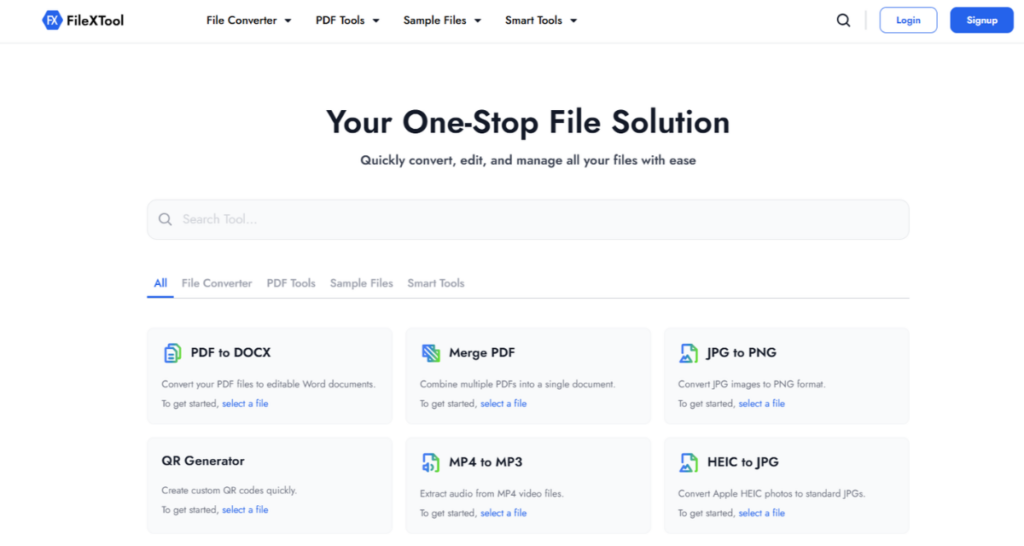
Visit the FileXTool website using your browser. The platform works smoothly on:
- Desktop
- Mobile
- Tablet
- Windows
- Mac
No installation or technical setup is required.
Step 2: Go to the eBook File Converter
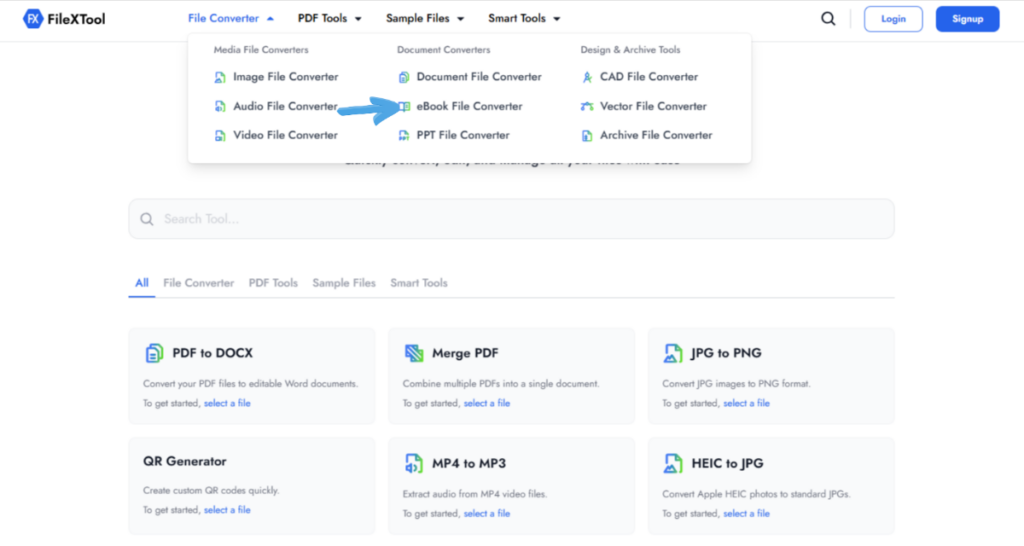
After opening FileXTool, navigate to the eBook File Converter section. Here, you will find multiple ebook conversion options designed for different file formats and reading devices.
This section helps users quickly convert ebooks online without using complicated software.
Step 3: Choose Input eBook Format
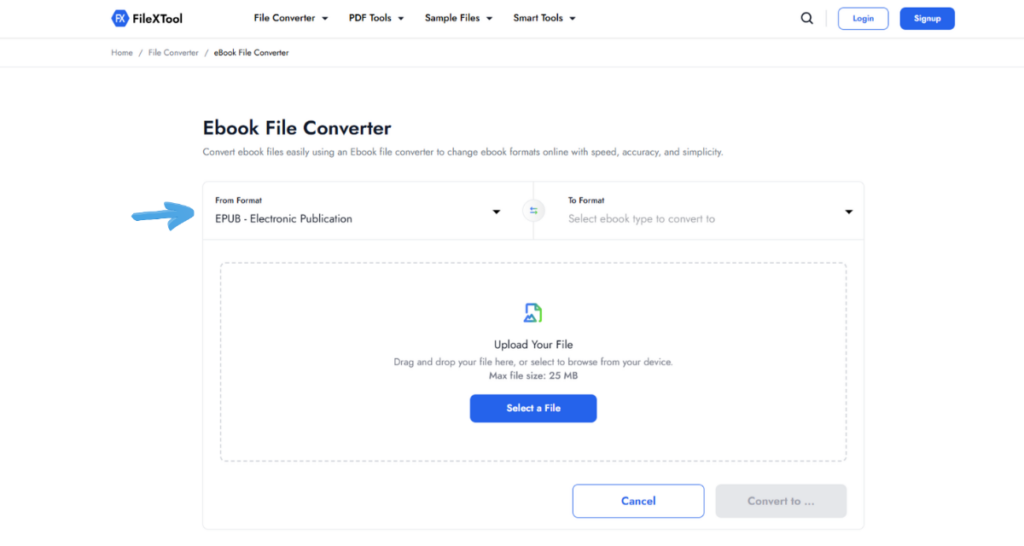
Select your current ebook format, such as:
- EPUB
- MOBI
- AZW3
- TXT
Choosing the correct source format helps improve conversion accuracy.
Step 4: Select Output Format
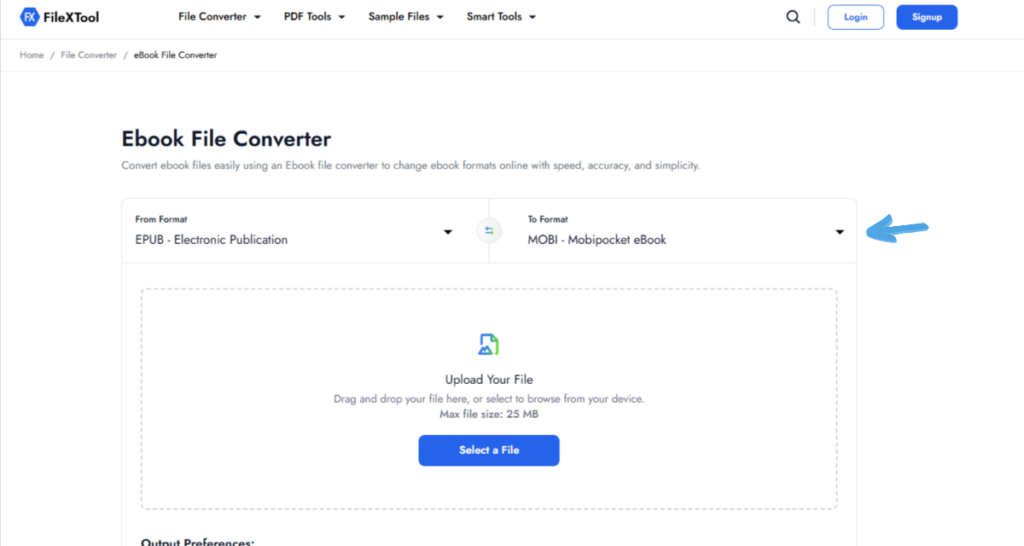
Choose the format you want to convert your ebook into.
For example:
- EPUB to MOBI
- PDF to EPUB
- AZW3 to TXT
This improves compatibility across Kindle devices, smartphones, tablets, and ebook reader apps.
Step 5: Upload Your File
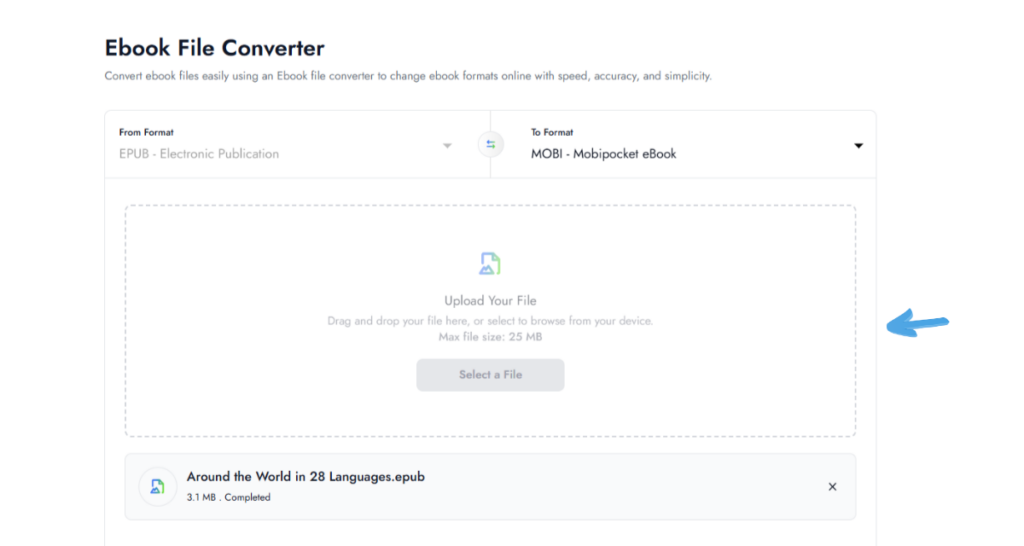
Upload the ebook file directly from your device. The tool securely processes files online while maintaining formatting and readability.
Step 6: Click Convert
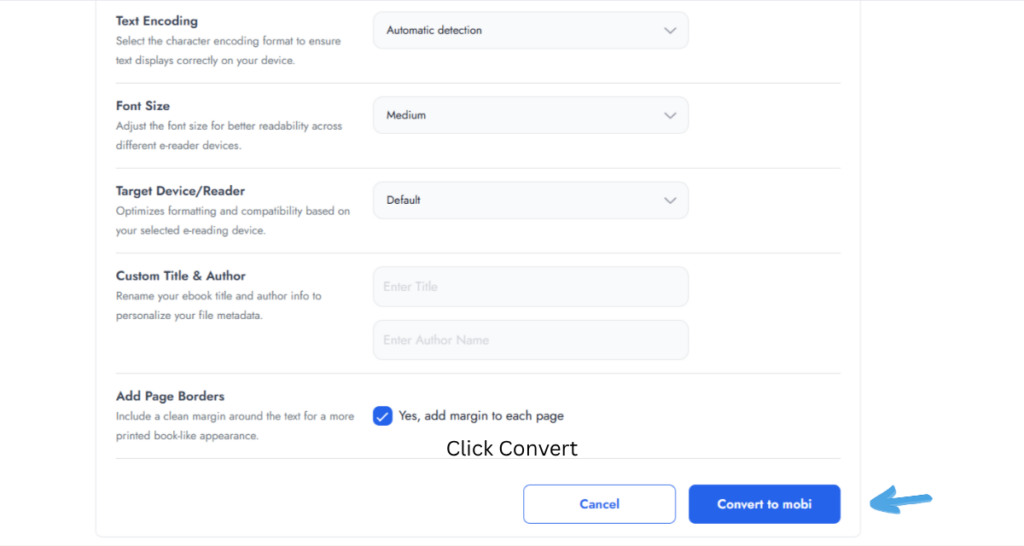
Press the convert button to begin the conversion process. The system automatically processes the file and optimizes it for better compatibility and smoother reading performance.
Step 7: Download Converted eBook
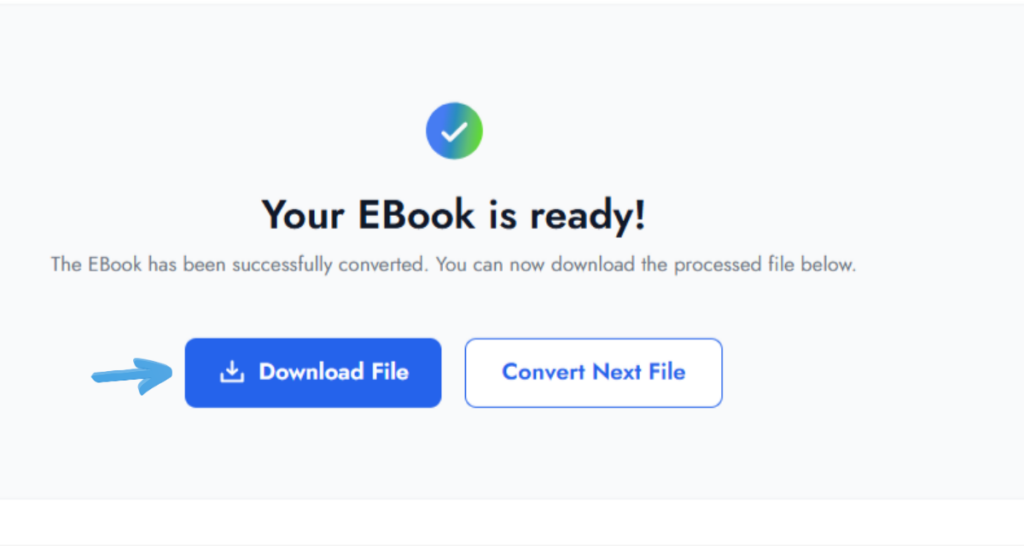
Once the conversion is complete, download the converted ebook instantly. You can now open the file on your preferred reading device without compatibility issues.
This is one of the easiest and fastest ways to convert ebooks online without complicated software or technical knowledge.
Common Problems During eBook Conversion
Even good conversions may occasionally face issues.
Here are the most common problems and solutions.
Formatting Issues
Problem:
Text spacing or layouts break after conversion.
Solution:
Use clean source files and trusted converters.
Missing Images
Problem:
Images disappear after conversion.
Solution:
Use high-quality source files and supported formats.
Unsupported Devices
Problem:
The ebook still does not open.
Solution:
Choose the correct format for your device.
Font Problems
Problem:
Fonts appear broken or unreadable.
Solution:
Use standard fonts during conversion.
Broken Layouts
Problem:
Tables or chapters shift incorrectly.
Solution:
Preview converted files before downloading.
Using professional tools reduces these issues significantly.
Best Features to Look for in an eBook Format Converter
Choosing the right converter is important for smooth ebook reading.
Fast Conversion
The tool should process files quickly without delays.
Multi-Format Support
A good converter should support:
- EPUB
- MOBI
- AZW3
- TXT
Cloud Access
Online access allows conversions from any device.
No Software Installation
Browser-based tools simplify the process for beginners.
Secure Uploads
Your uploaded ebooks should remain protected and private.
A reliable ebook format converter improves both compatibility and reading quality.
Why Online eBook Converters Are Growing in 2026
The demand for online ebook conversion tools continues growing rapidly in 2026.
Cloud-Based Reading Is Increasing
More readers now access books across multiple devices.
AI Publishing Growth
AI-generated ebooks require faster multi-format publishing.
Mobile Reading Trends
Smartphone reading continues increasing worldwide.
Faster Workflows
Authors and publishers need instant conversion tools.
Better Accessibility
Readers want formats optimized for accessibility and screen customization.
This growth makes online ebook conversion more important than ever.
Pro Tips for Better eBook Conversion Results
Pro Tips
Use Clean Source Files
Poorly formatted files create conversion issues.
Choose Correct Output Format
Always match the format to your reading device.
Optimize Images Before Conversion
Large images may affect performance.
Preview Converted Files
Always test the ebook before sharing or publishing.
Common Mistakes
Wrong Format Selection
Using unsupported formats creates compatibility problems.
Ignoring Device Compatibility
Different readers require different formats.
Using Low-Quality Converters
Poor tools often damage layouts and formatting.
For additional file conversion guidance, you can also read:
Conclusion
eBook conversion has become essential for modern readers, students, authors, and publishers who use multiple devices and platforms every day. Since different ebook readers support different file formats, using a reliable ebook file converter helps eliminate compatibility issues while improving accessibility and reading experience.
Whether you want to convert EPUB to MOBI, PDF to TXT, or optimize ebooks for Kindle, online conversion tools make the process simple, fast, and beginner-friendly. Instead of struggling with unsupported files and broken layouts, you can quickly convert ebooks into formats that work perfectly across all your devices.
Ready to simplify your reading experience?
Use FileXTool today to convert ebooks online in just a few clicks and enjoy smooth compatibility anywhere, anytime.
FAQs
Q1: What is an ebook file converter?
An ebook file converter is a tool that changes one ebook format into another format for better compatibility across devices and reading apps. It helps users open ebooks on Kindle, smartphones, tablets, and computers by converting unsupported file types into compatible formats like EPUB, MOBI, PDF, AZW3, or TXT.
Q2: Can I convert ebooks online for free?
Yes, many platforms allow users to convert ebook online for free without installing software. Online converters simplify the process by letting users upload files, choose output formats, and download converted ebooks instantly. Browser-based tools are especially useful for students, readers, publishers, and professionals working across multiple devices.
Q3: Which ebook format is best for Kindle?
AZW3 and MOBI are commonly considered the best formats for Kindle devices. AZW3 offers improved formatting and modern Kindle compatibility, while MOBI works well on older Kindle readers. EPUB is also becoming more compatible with newer Kindle systems through conversion tools and Amazon’s updated support features.
Q4: Is online ebook conversion safe?
Yes, online ebook conversion is generally safe when using trusted platforms with secure processing systems. Reliable converters protect uploaded files during conversion and automatically remove files after processing. Users should avoid unknown websites and always choose professional ebook conversion tools that prioritize privacy, security, and safe file handling practices.
Q5: Why is my ebook formatting broken after conversion?
Formatting problems usually happen because different ebook formats support layouts differently. Fonts, images, tables, spacing, and responsive text may shift during conversion. Using clean source files, selecting the correct output format, and using a high-quality ebook file converter greatly improves formatting accuracy and overall reading experience.