


Ever printed a QR code on packaging, posters, or restaurant menus only to realize the link cannot be changed later? Or maybe you wanted to track how many people scanned your QR code but discovered there were no analytics available.
These are some of the biggest problems businesses, marketers, restaurants, event organizers, and product brands face when choosing the wrong QR code type.
Today, QR codes are everywhere:
- Product packaging
- Digital menus
- Event tickets
- Business cards
- Marketing campaigns
- Payment systems
But here’s the truth most people discover too late:
Choosing between a static and dynamic QR code can directly affect your scan success, campaign performance, and customer experience.
In this guide, you’ll learn the real difference between static vs dynamic QR code systems, when to use each one, and why dynamic QR codes are becoming the preferred choice for modern businesses in 2026.
What is a Static QR Code?
A static QR code is a fixed QR code that permanently stores information inside the code itself. Once created, the content cannot be changed or edited later.
This means if you print a static QR code with the wrong link, outdated webpage, or incorrect contact information, you must generate and print a completely new QR code.
When comparing static vs dynamic qr code systems, static QR codes are considered simpler but far less flexible.
Common Uses of Static QR Codes
Static QR codes are mainly used for:
- WiFi passwords
- Personal contact cards
- Basic website URLs
- One-time sharing
- Offline personal usage
Because the information never changes, static codes work best for permanent content.
Limitations of Static QR Codes
Although static QR codes are simple, they come with major limitations:
- No scan tracking
- No analytics
- No editing after creation
- Difficult to update once printed
- No campaign optimization
For businesses and marketers, these limitations can become expensive because reprinting materials costs both time and money.
This is one of the biggest reasons many companies now prefer dynamic QR codes instead.
What is a Dynamic QR Code?
A dynamic QR code is an editable QR code that allows you to change the destination URL or content even after the QR code has been created and printed.
Unlike static QR codes, the information is not permanently stored inside the QR image itself. Instead, the QR code points to a redirect link that can be updated anytime.
This flexibility is what makes the dynamic qr code vs static debate so important for businesses and digital marketers.
Benefits of Dynamic QR Codes
Dynamic QR codes offer several advantages:
- Editable destination URLs
- Scan tracking and analytics
- Better marketing optimization
- Easier campaign management
- Reduced reprinting costs
- Improved flexibility
For example, if your landing page changes later, you can simply update the URL without generating a new QR code.
You can create your QR code here using the dynamic QR code generator
When discussing dynamic vs static qr code options, dynamic QR systems clearly provide more control and long-term usability.
Static vs Dynamic QR Code: Key Differences
Understanding the difference between static and dynamic qr code systems helps businesses avoid expensive mistakes.
Here’s a simple comparison table:
| Feature | Static QR Code | Dynamic QR Code |
|---|---|---|
| Editable | No | Yes |
| Scan Tracking | No | Yes |
| Best For | Personal Use | Marketing & Business |
| URL Updates | Not Possible | Possible |
| Analytics | Limited | Advanced |
| Long-Term Flexibility | Low | High |
| Campaign Optimization | Limited | Excellent |
| Reprinting Required | Often | Rarely |
The biggest difference between static and dynamic QR code systems is flexibility.
Static QR codes work for fixed information, while dynamic QR codes support editing, tracking, and campaign management.
When Should You Use Static vs Dynamic QR Codes?
The answer depends entirely on your goals.
Use Static QR Codes When:
Static QR codes work best when:
- Information will never change
- You need simple personal sharing
- You only need one-time usage
- No tracking is required
Examples:
- WiFi access
- Resume links
- Simple business cards
Use Dynamic QR Codes When:
Dynamic QR codes are better for:
- Marketing campaigns
- Restaurant digital menus
- Product packaging
- Event management
- Business promotions
- Scan tracking
- Updating landing pages later
This is where the static vs dynamic qr code comparison becomes critical.
Imagine printing 10,000 flyers with the wrong URL. With a static QR code, you must reprint everything. With a dynamic QR code, you simply edit the destination link instantly.
Common Problems Businesses Face
Many businesses accidentally use static QR codes and later face issues such as:
- Wrong printed links
- No scan analytics
- Expired landing pages
- Campaign tracking limitations
Dynamic QR codes solve these problems by offering flexibility and editable functionality.
Why Dynamic QR Codes Have Higher Scan Success Rates
Dynamic QR codes usually perform better because they improve both user experience and campaign optimization.
Editable Links Reduce Mistakes
If a webpage changes later, businesses can instantly update the destination URL without replacing the QR code.
Better User Experience
Users always reach updated and working content, improving trust and engagement.
Analytics Improve Optimization
Dynamic QR systems allow businesses to track:
- Scan counts
- Device types
- Locations
- Campaign performance
This data helps marketers improve conversion rates over time.
Cleaner QR Code Structure
Dynamic QR codes often generate shorter redirect URLs, which create cleaner and easier-to-scan QR images.
This improves scan reliability across:
- Packaging
- Posters
- Restaurant menus
- Mobile displays
Today, dynamic QR codes are becoming essential for digital marketing, smart packaging, and customer engagement campaigns.
How to Create a Dynamic QR Code Using FileXTool (Step-by-Step)
Creating a dynamic QR code with FileXTool is simple and beginner-friendly.
Step 1: Open FileXTool
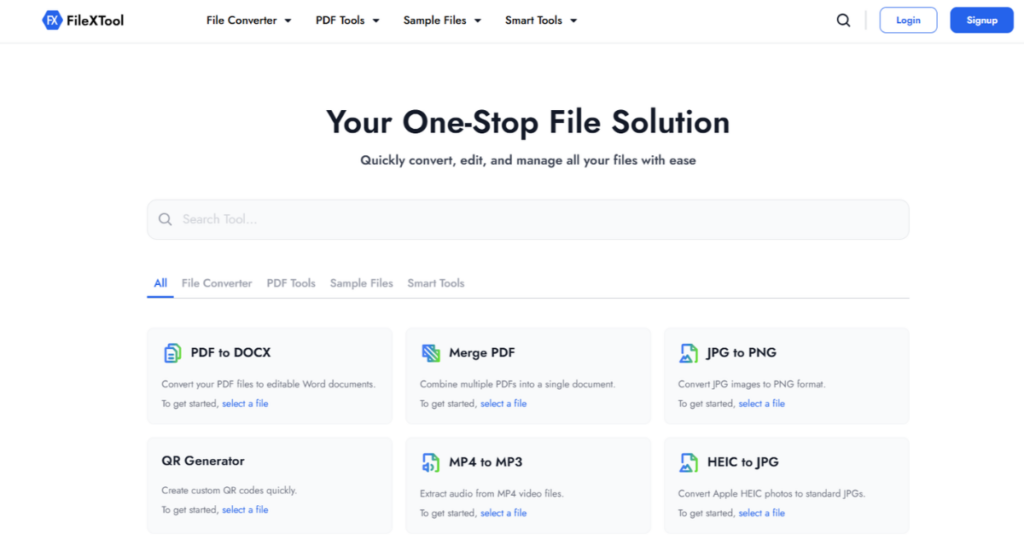
Visit the QR Generator page on FileXTool.
Step 2: Go to Smart Tools
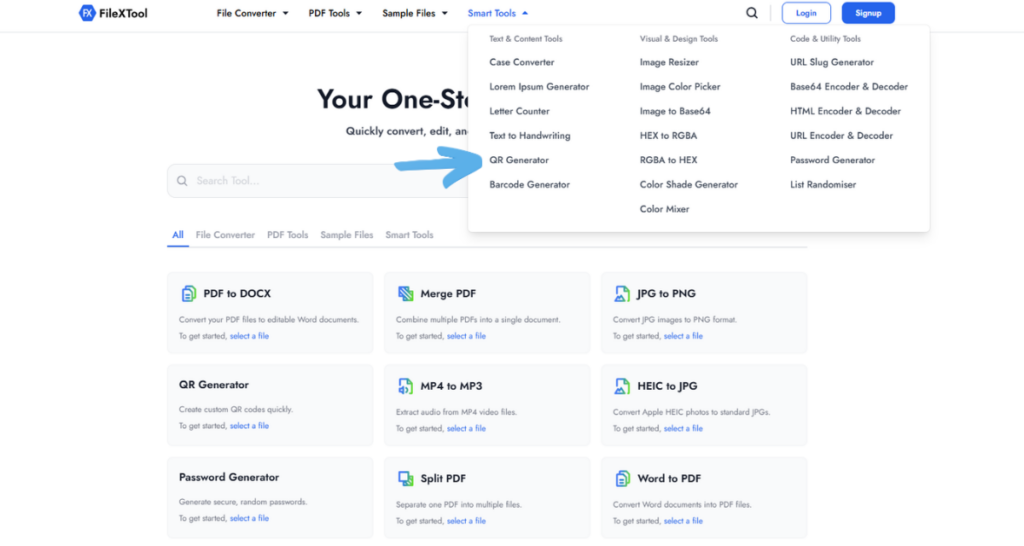
Open the Smart Tools section and select the QR Generator option.
Step 3: Paste Your URL
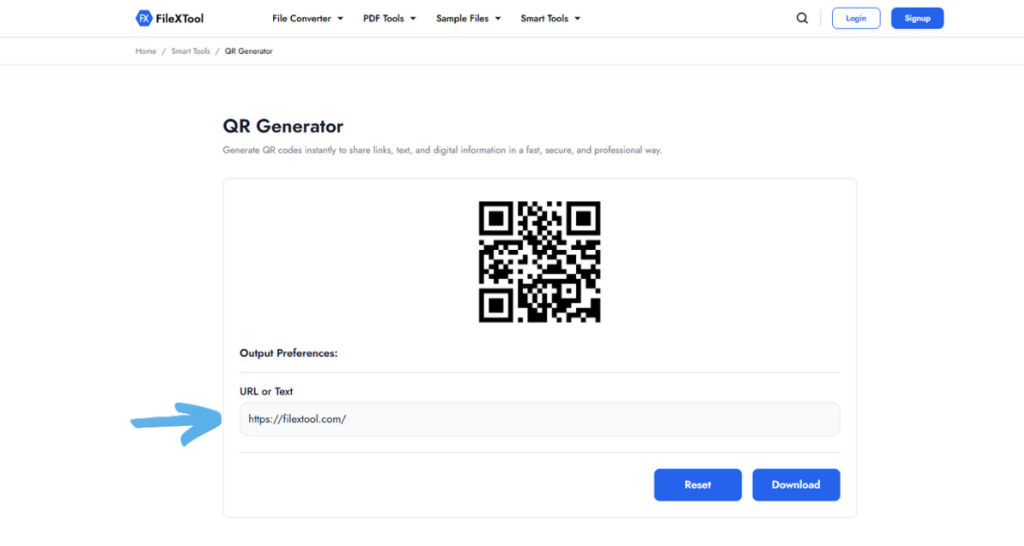
Enter the website, landing page, product page, or any URL you want users to visit.
Step 4: Generate the QR Code
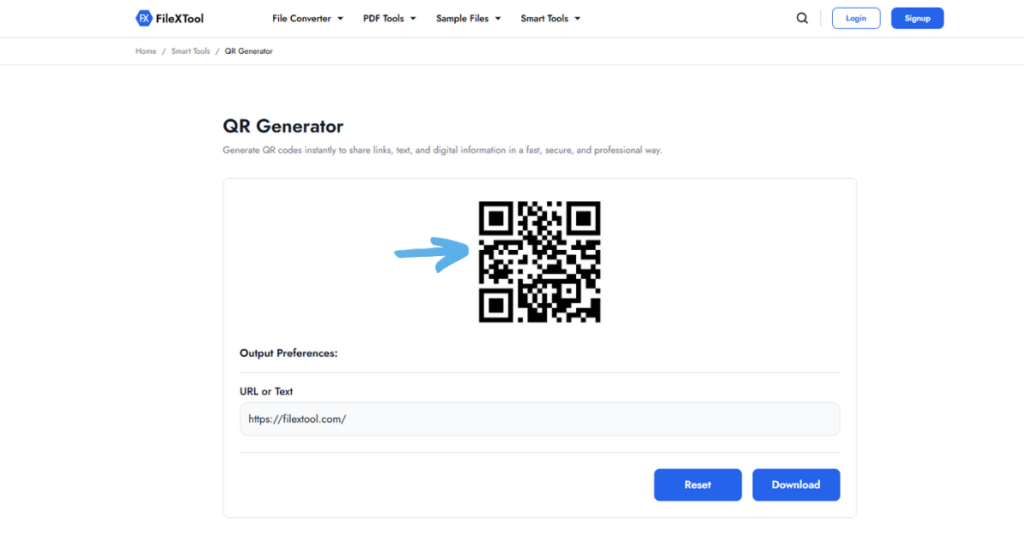
Click the generate button to instantly create your QR code.
Step 5: Download Your QR Code
Download the QR image and start using it across:
- Posters
- Packaging
- Menus
- Business cards
- Marketing campaigns
You can also learn more from this detailed guide on how to generate QR code
Common Mistakes People Make With QR Codes
Many QR campaigns fail because of avoidable mistakes.
Using Static QR Codes for Campaigns
Businesses often choose static QR codes without realizing they cannot edit links later.
Solution:
Use dynamic QR codes for campaigns and promotions.
Printing Without Testing
Some QR codes fail after printing because they were never tested properly.
Solution:
Always test the QR code across multiple devices before publishing.
Linking Broken URLs
Expired or broken pages create poor customer experiences.
Solution:
Use editable dynamic QR codes to update URLs anytime.
Low-Resolution QR Images
Blurry QR codes reduce scan accuracy.
Solution:
Always download high-quality QR images.
Ignoring Analytics
Without tracking data, campaign optimization becomes difficult.
Solution:
Use dynamic QR systems with scan analytics.
Pro Tips to Improve QR Code Scan Success
Improving scan success is not only about QR generation — placement and design matter too.
Use High Contrast Colors
Dark QR codes on light backgrounds scan best.
Keep Enough White Space
Avoid placing elements too close to the QR code.
Add a Clear CTA
Tell users what they will get after scanning.
Examples:
- Scan to View Menu
- Scan to Download
- Scan to Claim Offer
Optimize Landing Pages for Mobile
Most QR scans happen on smartphones.
Place QR Codes Strategically
Avoid placing QR codes too high, too small, or in poor lighting conditions.
Dynamic QR codes improve long-term flexibility and campaign performance significantly.
QR Code Trends in 2026
QR technology continues evolving rapidly in 2026.
Smart Packaging Growth
Brands now use QR codes for:
- Product authentication
- Customer engagement
- Interactive packaging
Restaurant Digital Menus
Restaurants increasingly replace printed menus with QR-based systems.
Contactless Payments
QR-based payment systems continue growing globally.
AI-Powered Marketing Campaigns
Businesses now combine QR tracking with AI analytics for smarter campaign optimization.
Real-Time QR Analytics
Dynamic QR systems provide real-time performance insights that improve decision-making.
The future clearly favors dynamic QR technology because businesses now prioritize flexibility, analytics, and customer engagement.
Conclusion
Choosing between static and dynamic QR codes can directly impact your scan success, customer experience, and marketing performance. Static QR codes work well for simple permanent information, but they become limiting when businesses need flexibility, tracking, or editable campaigns.
Dynamic QR codes provide a smarter solution by allowing businesses to update links, monitor scan performance, and improve campaign effectiveness without reprinting materials. This flexibility makes them the preferred choice for restaurants, marketers, product packaging, event organizers, and growing brands.
If you want better QR code performance and long-term usability, dynamic QR codes are the clear winner.
Start creating smarter QR campaigns today with FileXTool and generate dynamic QR codes in just a few clicks.
FAQs
Q1: What is the difference between static and dynamic QR code?
The main difference between static and dynamic QR code systems is editability. Static QR codes permanently store information and cannot be changed later, while dynamic QR codes allow users to edit destination links anytime. Dynamic QR codes also support analytics, scan tracking, and campaign optimization, making them more suitable for businesses and marketing purposes.
Q2: Which is better: static or dynamic QR code?
Dynamic QR codes are generally better for businesses, marketing campaigns, and long-term use because they provide editable links, analytics, and scan tracking. Static QR codes are useful for simple permanent information like WiFi passwords or personal contact details. The best option depends on whether flexibility and tracking are important for your usage.
Q3:Can I edit a static QR code?
No, static QR codes cannot be edited after creation because the information is permanently embedded inside the QR image itself. If you need to change the destination URL or content, you must generate a completely new QR code. Dynamic QR codes solve this problem by allowing editable links without reprinting materials.
Q4: Why are dynamic QR codes better for businesses?
Dynamic QR codes help businesses track scan performance, edit links later, reduce printing costs, and optimize marketing campaigns. They also improve customer experience because businesses can update landing pages anytime without replacing the QR code. This flexibility makes dynamic QR technology ideal for promotions, menus, packaging, and digital marketing strategies.
Q5: How do I generate a dynamic QR code online?
You can generate a dynamic QR code online using FileXTool. Simply open the Smart Tools section, select the QR Generator, paste your URL, generate the QR code, and download it instantly. The process is beginner-friendly, requires no technical skills, and helps create editable QR codes for business or marketing use.