


Older DOC files still exist in many systems, but most modern word processing tools now use the DOCX format because it offers better compatibility, smaller file size, and improved document handling. This is why many users search for how to convert DOC into DOCX when working with older Word documents.
Converting a DOC file into DOCX can help improve sharing, editing, storage efficiency, and compatibility across newer versions of Microsoft Word and other document platforms. The process is usually simple, but understanding the difference between both formats makes the conversion more useful.
Whether you are handling office documents, academic files, reports, or archived Word files, learning how to convert DOC into DOCX can help create a smoother and more reliable document workflow. This guide explains everything in a simple step-by-step format for beginners and regular users alike.
Steps to Convert DOC into DOCX
Converting older Word files into DOCX format is usually a quick process when you use the right tool. If you are searching for how to convert DOC into DOCX, these steps can help you complete the conversion smoothly while maintaining document formatting and compatibility.
Step 1: Open the FileXTool Website
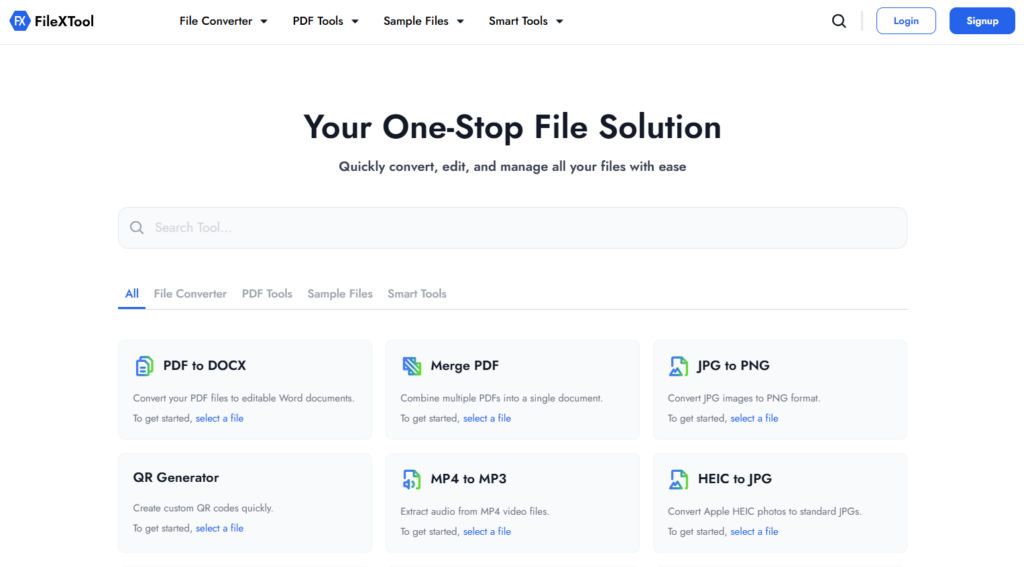
Open the FileXTool website in your browser to begin the conversion process. This allows you to access online document tools without installing additional software on your device.
Step 2: Go to the File Converter and Select Document File Converter
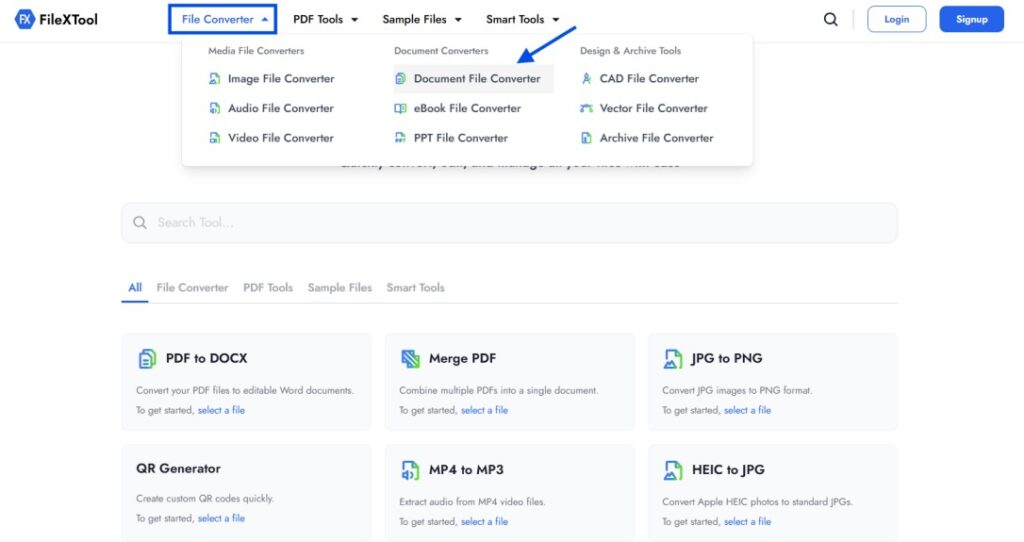
Navigate to the file conversion section and choose the Document File Converter tool. This option helps users manage different document formats and supports simple Word file conversion workflows.
Step 3: Choose DOC in From Format and DOCX in To Format
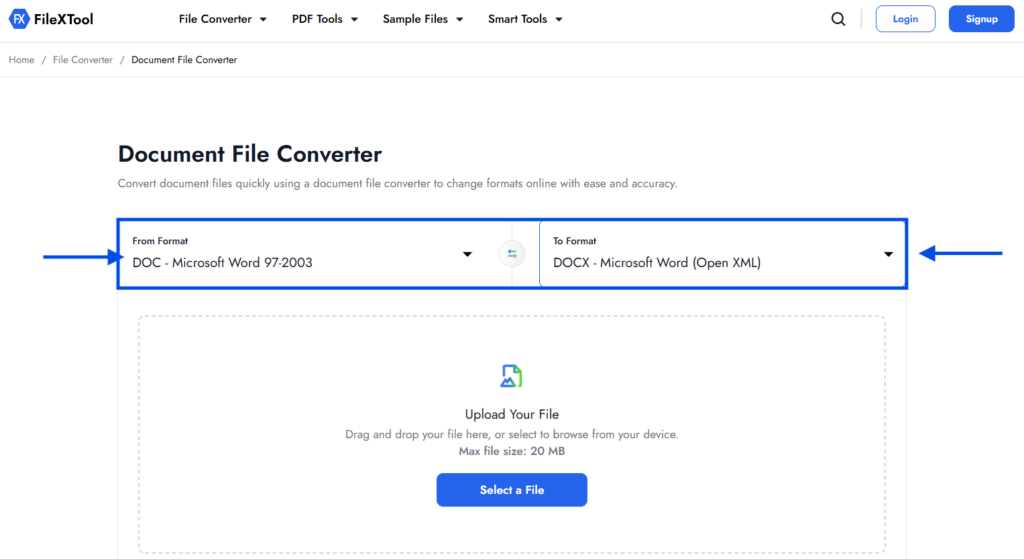
Select DOC as the source format and DOCX as the target format. This step ensures the tool understands exactly how to convert DOC into DOCX correctly.
Step 4: Upload Your DOC File by Clicking on Select a File
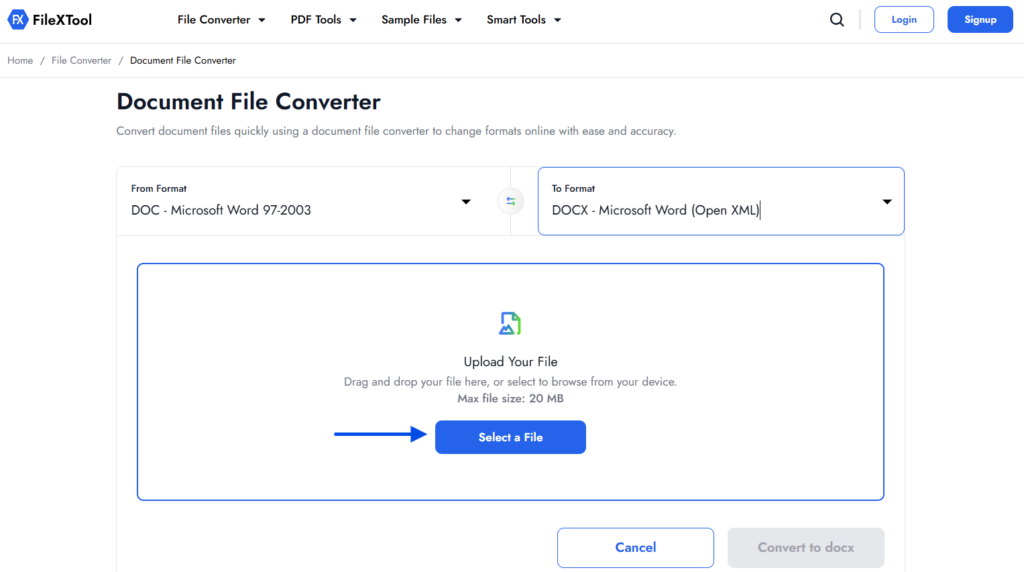
Click on the upload option and choose the DOC document you want to convert. If you regularly convert doc to docx, keeping files properly organized can help simplify the process further.
Step 5: Click on Convert to DOCX
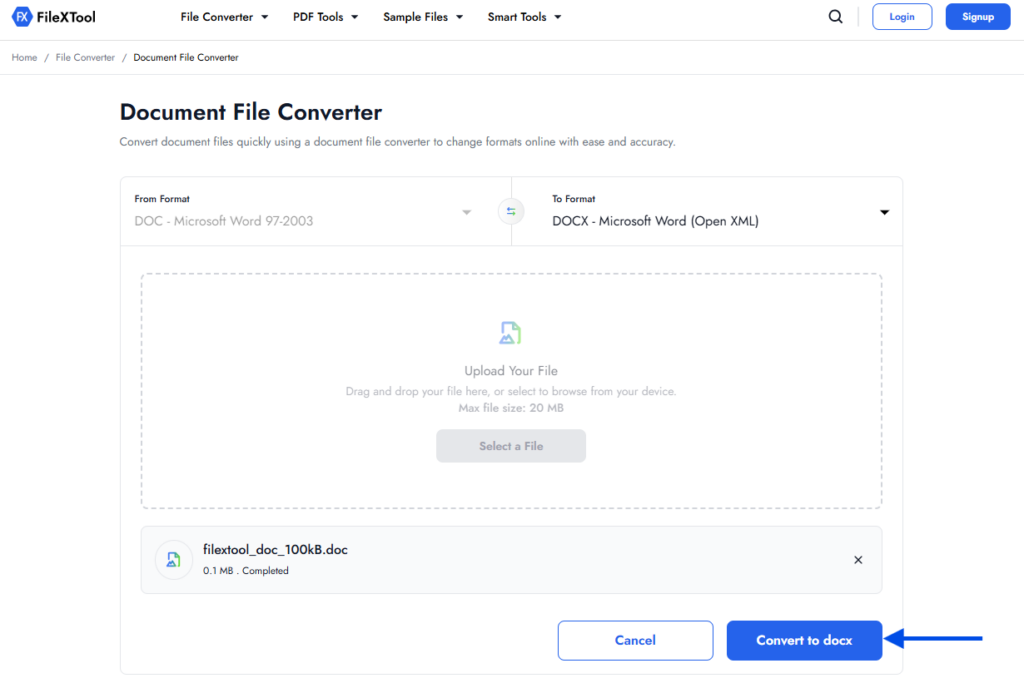
After uploading the file, click the convert button to start the process. The system will process the document and prepare the updated DOCX version while preserving most formatting elements.
Step 6: Download the Converted DOCX File
Once the conversion is complete, download the updated DOCX file to your device. You can now open, edit, and share the file more easily across modern document platforms and applications.
What Is a DOC File?
A DOC file is an older Microsoft Word document format that was widely used before the introduction of DOCX. It stores text, formatting, images, tables, and other document elements in a single file, making it one of the most recognized formats for Word documents over the years.
Although DOC files still work in many applications, they are now considered older compared to newer formats. During modern Word file conversion workflows, many users choose to upgrade DOC files into DOCX for better compatibility, improved file management, and smoother editing across current software versions.
What Is a DOCX File?
DOCX is the modern default file format used by Microsoft Word for creating and editing documents. It was introduced to improve file efficiency, compatibility, and overall document performance compared to older DOC files.
One major advantage of DOCX is that it usually creates smaller file sizes while maintaining document quality and formatting. It also supports improved recovery features, better compatibility with modern software, and smoother sharing across devices and platforms.
Because of these benefits, many users now search for how to convert DOC into DOCX when working with older Word documents. Using DOCX often helps create a more stable and efficient document workflow for business, academic, and personal use.
DOC vs DOCX: What’s the Difference?
Although both formats are used for Microsoft Word documents, DOC and DOCX differ in structure, compatibility, file size, and overall performance. Understanding these differences makes it easier to decide when how to change DOC to DOCX becomes necessary.
| Feature | DOC | DOCX |
|---|---|---|
| File Format Type | Older Microsoft Word format | Modern Microsoft Word format |
| File Size | Usually larger | Generally smaller |
| Compatibility | Best with older Word versions | Better with modern applications |
| Recovery Features | Limited | Improved recovery support |
| Performance | Slower in larger files | More efficient and stable |
| Editing Support | Basic | Supports advanced modern features |
| Security | Less optimized | Better structured and secure |
Today, DOCX is more commonly used because it supports modern Word file conversion workflows and works more efficiently across updated platforms and document tools.
Benefits of Converting DOC to DOCX
Many users still work with older DOC files, but converting them into DOCX can improve compatibility, editing performance, and document management. Understanding these advantages helps explain why people often search for how to convert DOC into DOCX in modern workflows.
Better Compatibility Across Modern Software
DOCX files work more smoothly with current versions of Microsoft Word and many other document platforms. This reduces formatting issues while sharing or editing files across devices.
Smaller File Size
DOCX files are usually smaller compared to older DOC files because of improved file structuring and compression. Smaller documents are easier to store, upload, and share online.
Improved Editing Features
Modern Word tools and formatting features are designed mainly for DOCX files. This allows users to work with updated editing functions more efficiently.
More Reliable File Recovery
DOCX files generally offer better recovery support if a document becomes damaged or closes unexpectedly during editing.
Easier File Sharing and Conversion
Modern document workflows often depend on DOCX because it works better with online platforms and conversion tools. Users who frequently handle document formats may also explore resources like How to Convert PDF to Word when managing broader file conversion needs.
Common Problems During DOC to DOCX Conversion
Although the process is usually simple, some users may still face minor issues during Word file conversion, especially when working with older or heavily formatted documents.
- Formatting changes after conversion
- Missing fonts or altered text spacing
- Unsupported elements from older Word versions
- Corrupted DOC files causing conversion errors
- Images or tables shifting positions in the document
- Compatibility issues with outdated software
- Password-protected DOC files not converting properly
- Broken hyperlinks or embedded objects after conversion
When You Should Convert DOC to DOCX
Converting DOC files becomes useful when you regularly work with modern document software or need smoother compatibility across different devices and platforms. Many newer applications are optimized mainly for DOCX, which is why users often look for how to convert DOC into DOCX during document management tasks.
DOCX files are also more practical for sharing, cloud storage, collaboration, and long-term document handling. Smaller file sizes and improved recovery support can help reduce issues while editing or transferring files online.
If you still have older DOC files stored from previous projects, converting them into DOCX can help create a more efficient and updated workflow without changing the actual document content.
Tips for Smooth Word File Conversion
A smooth conversion process can help preserve formatting, improve compatibility, and reduce file-related issues later. Whether you occasionally convert documents or regularly search for how to convert DOC into DOCX, following a few practical steps can make the process more reliable and efficient.
- Keep a Backup of the Original File
Always save a copy of the original DOC file before starting the conversion process. This helps prevent accidental data loss if something goes wrong.
- Use Reliable Conversion Tools
Choosing trusted tools for Word file conversion can help maintain formatting, images, and document structure more accurately.
- Check Formatting After Conversion
After converting the file, review headings, tables, fonts, and spacing to ensure the DOCX version appears correctly.
- Avoid Converting Corrupted Files
Damaged or incomplete DOC files may create errors during conversion and can affect the final DOCX document quality.
- Organize Converted Files Properly
Keeping DOC and DOCX versions in separate folders can help avoid confusion while editing or sharing documents later.
- Verify Compatibility Before Sharing
Open the converted DOCX file in your preferred document software to confirm everything works correctly before sending it to others.
Final Thoughts
Many older Word documents are still stored in DOC format, especially in archived files, office systems, or older projects. But as modern document tools continue evolving, DOCX has become the more practical format for editing, sharing, and long-term compatibility.
Knowing how to convert DOC into DOCX is less about changing the file itself and more about making documents easier to manage in current workflows. A simple conversion can help avoid compatibility issues, improve accessibility, and support smoother collaboration across devices and platforms.
If you regularly work with document formats, tools like FileXTool can also help simplify everyday file handling tasks when quick document conversion becomes necessary.
FAQs
1. Are .doc and .DOCX the same?
No, DOC and DOCX are different Microsoft Word file formats. DOC is the older format, while DOCX is the newer and more efficient version used by modern Word applications. Many users search for how to convert DOC into DOCX using tools like FileXTool to improve compatibility and document handling.
2. How do I turn a file into a DOCX file?
You can turn a DOC file into DOCX by uploading it to FileXTool, selecting DOCX as the output format, and starting the conversion process. If you are learning how to convert DOC into DOCX, this method keeps the process simple and beginner friendly.
3. Why should I convert DOC into DOCX?
DOCX files usually offer better compatibility, smaller file sizes, and improved document recovery compared to older DOC files. This is one reason why many users prefer how to convert DOC into DOCX for modern document workflows and easier file sharing.
4. Can I convert DOC to DOCX without Microsoft Word?
Yes, FileXTool allows users to convert DOC files into DOCX directly through a browser without needing Microsoft Word installed on the device.
5. Does converting DOC to DOCX change formatting?
In most cases, formatting remains the same after conversion. However, older DOC files with unsupported fonts, layouts, or embedded elements may sometimes show small formatting changes in the DOCX version.