


QR codes are now part of everyday life – used on restaurant menus, product packaging, business cards, and event passes. Despite how common they are, many people still generate them incorrectly, leading to codes that fail to scan or link to the wrong destination.
A QR code stores data in a visual pattern that any smartphone camera can read instantly – whether it’s a URL, contact details, WiFi credentials, or plain text. Knowing which type to use before you generate a QR code saves you from redoing the entire thing later.
This guide explains how to generate a QR code step by step using FileXTool, along with the right size, correct type, and common mistakes to avoid – everything most tutorials skip.
How to Generate QR Code Step by Step
How to generate QR code is simple when you follow the right process.
The steps below explain how to create a QR code easily, even if you are doing it for the first time.
Step 1: Open the FileXTool Website
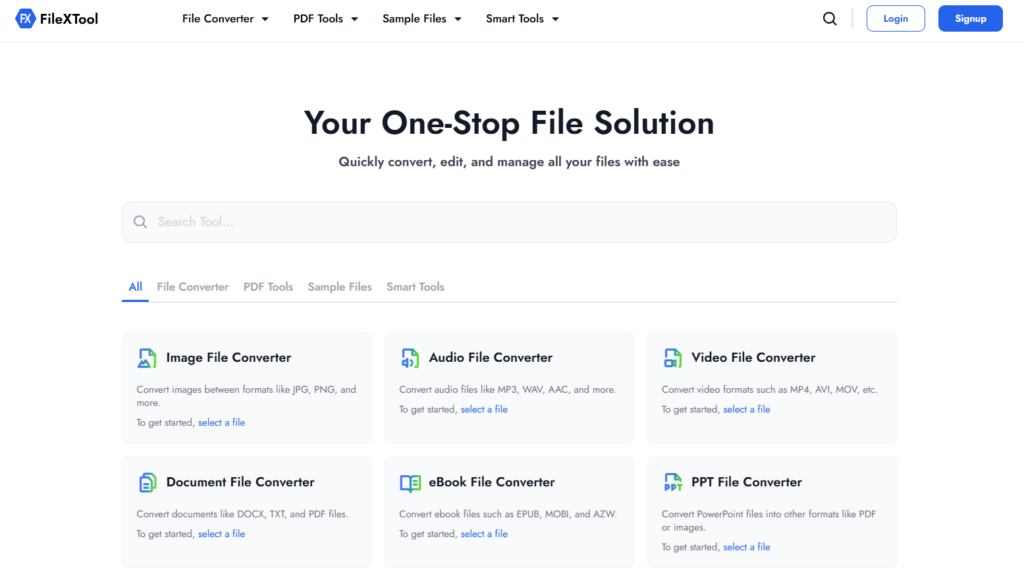
Open your web browser and visit the FileXTool website. You do not need to install any software, which makes the process quick and beginner-friendly. This allows you to generate a QR code directly online.
Step 2: Click on the Smart Tools Option
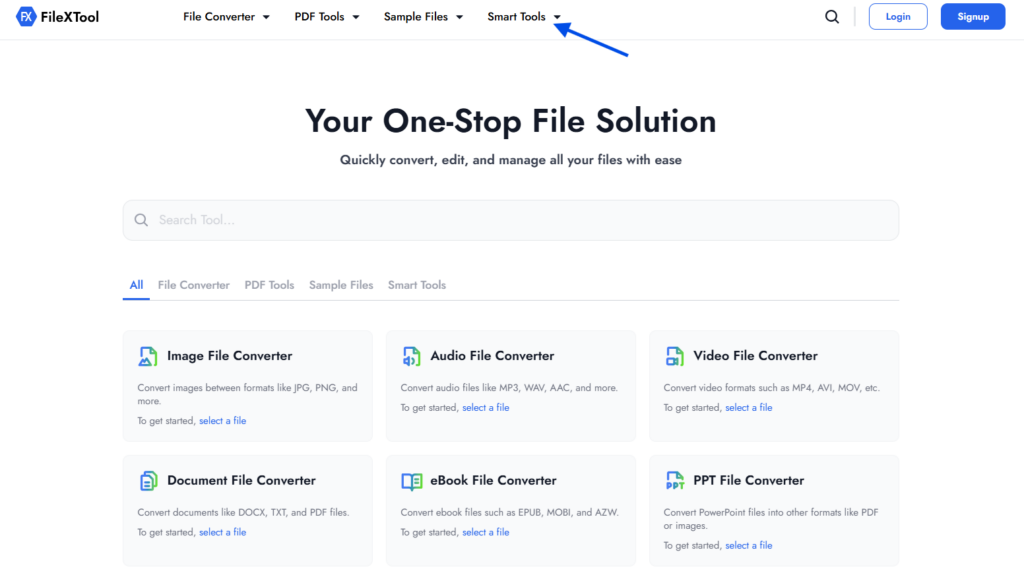
From the navigation menu, select the Smart Tools section. This is where all utility-based tools including the QR generator are listed.
Step 3: Select the QR Generator Option
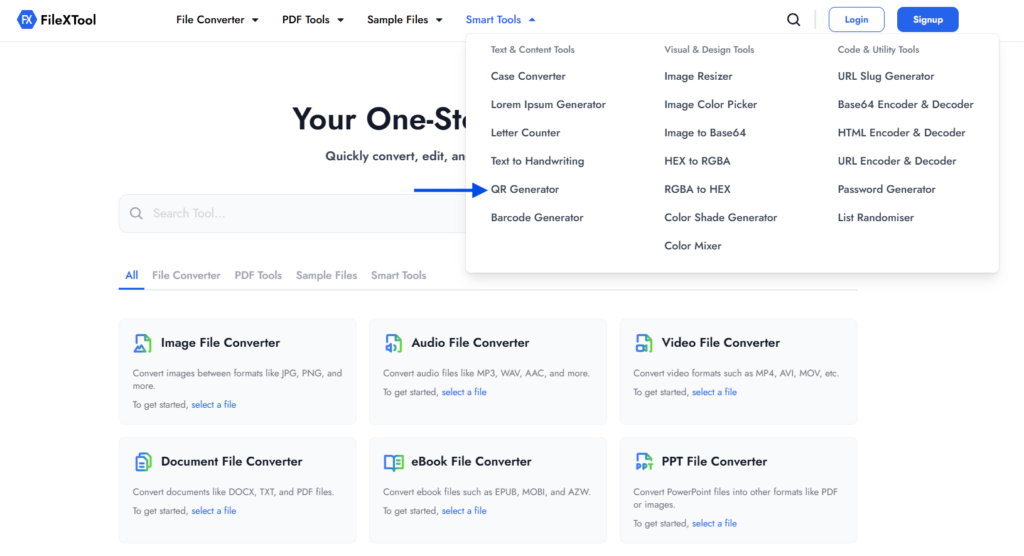
Click on the QR Generator option to open the creation interface. This is where you will enter the data you want to encode.
Step 4: Enter Your URL or Text
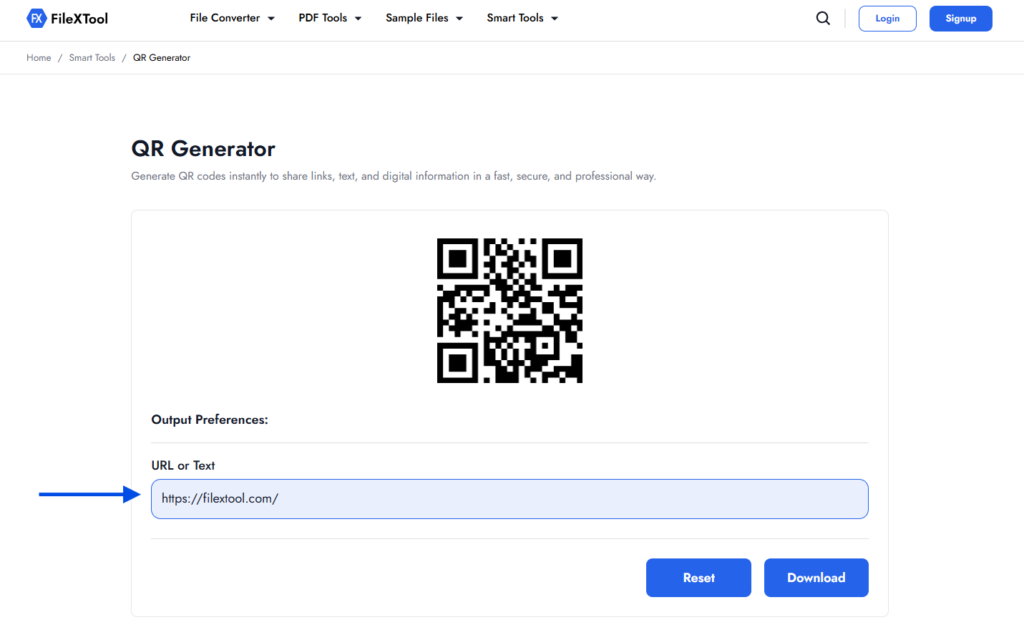
Type or paste the content you want to generate a QR code for — a website link, plain text, or any supported format. Double-check it before moving ahead.
Step 5: Click on Download to Save the QR Code
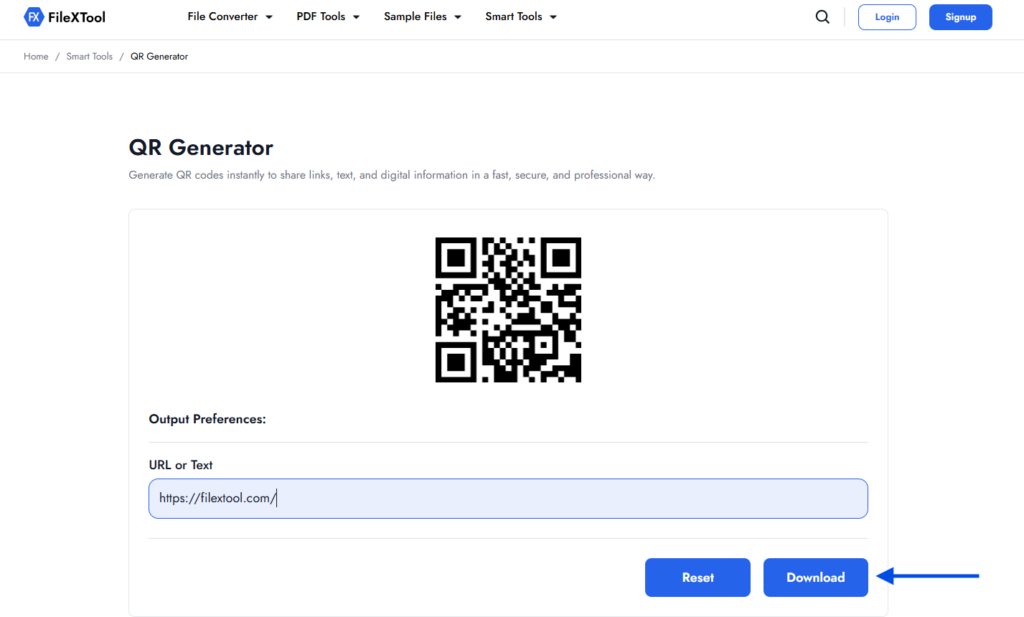
Click Download to save the code to your device. Your QR code is ready to use across print and digital platforms.
Types of QR Codes You Should Know
Not all QR codes store the same type of data. Using the wrong type is the most common mistake people make before they even begin.
| QR Code Type | Stores | Best For |
|---|---|---|
| URL | Website link | Marketing, portfolios |
| Plain Text | Any text | Instructions, notes |
| vCard | Contact details | Business cards |
| WiFi | Network credentials | Offices, cafes |
| Pre-filled email | Support, contact forms | |
| SMS | Pre-filled message | WhatsApp campaigns |
| PDF/File | File download link | Brochures, menus |
Static vs Dynamic QR Codes
Static QR codes store data permanently — once created, the content cannot be changed. Dynamic QR codes store a redirect link, so you can update the destination anytime and also track how many times the code was scanned.
When Do You Need to Generate a QR Code?
There are many real-life situations where learning how to generate QR code becomes genuinely useful. Whenever sharing information manually feels slow, repetitive, or error-prone, a QR code offers a faster and cleaner solution. Instead of typing links, numbers, or long text, users can simply scan and access information instantly.
People often search for how to generate QR code when they want a quick way to connect offline content with digital information. A reliable QR code generator helps convert URLs, text, or data into scannable codes that work across devices and platforms.
Sharing Links Without Typing
When you need to share a website, form, or online resource, generating a QR code avoids typing mistakes. This is especially useful for posters, presentations, or printed documents where clickable links are not available.
Business and Marketing Use
Businesses frequently generate QR codes for menus, flyers, product packaging, and advertisements. Knowing how to generate QR code helps brands guide users directly to offers, landing pages, or contact details with one scan.
Events, Workshops, and Registrations
QR codes simplify event management by enabling quick access to registration forms, schedules, or entry passes. Organizers often rely on a QR code generator to reduce paperwork and improve attendee experience.
Educational and Personal Sharing
Students and professionals generate QR codes to share notes, assignments, portfolios, or reference links. This makes content sharing easier without sending multiple files or messages.
Document and Digital Workflow Support
While working with digital documents, QR codes are often used alongside PDFs and files. For example, if a document needs better structure before sharing, you may want to explore How to Reorder PDF Pages to keep content aligned before attaching or linking it through a QR code.
Common Uses of QR Codes in Everyday Life
QR codes have become a regular part of daily interactions because they simplify access to digital information. Once you understand how to generate QR code, it becomes easier to use them across personal, professional, and business settings. A dependable QR code generator allows users to create codes that work instantly on most smartphones.
Many people also become curious about how does a QR code work when they see it used in different places. In simple terms, it stores information in a scannable format that redirects users to the intended content within seconds.
Common everyday uses include:
- Sharing website links, portfolios, or social media profiles
- Accessing restaurant menus without physical copies
- Making digital payments through scan-based systems
- Checking in at events, offices, or public locations
- Providing quick access to product details or instructions
QR codes reduce manual effort and improve user convenience, which is why learning how to generate QR code is becoming increasingly valuable in everyday life.
When QR codes are used for documents, users often prepare files first by combining multiple PDFs. In such cases, it helps to understand How to Merge PDF Files before generating a single QR code for sharing.
Benefits of Using a QR Code Generator
Using a reliable QR code generator makes it easy to create scannable codes without technical knowledge. When you know how to generate QR code properly, you can share information faster while reducing manual steps for users. This approach is especially helpful for businesses and individuals who want quick, error-free access to digital content.
Another advantage is understanding how does a QR code work behind the scenes. A QR code stores data in a compact visual format that smartphones can read instantly, making information sharing smooth and efficient. With the right tool, generating and managing QR codes becomes a simple, repeatable process.
Faster Information Sharing
A QR code generator allows you to share links, text, or resources instantly. Instead of typing URLs, users can scan and access content in seconds.
Easy to Create and Use
Learning how to generate QR code does not require design or coding skills. Most tools offer a straightforward interface where you enter data and download the code.
Works Across Devices
QR codes work seamlessly on smartphones, tablets, and other devices. This makes them ideal for reaching a wide audience without compatibility issues.
Reduces Errors
Scanning a QR code eliminates typing mistakes. This improves accuracy when sharing links, contact details, or important instructions.
Flexible for Multiple Use Cases
Once you understand how to generate QR code, you can use it for marketing, education, payments, or personal sharing—all from one simple process.
Things to Check Before You Generate a QR Code
Before you generate a QR code, it is important to review a few basic details to ensure the code works smoothly for users. Even though the process of how to generate QR code is simple, small checks can prevent scanning issues later.
Taking a moment to verify your content also helps users better understand how does a QR code work in real-life use. A well-prepared QR code improves reliability and user trust.
- Check the accuracy of the content
Make sure the URL, text, or data you enter is correct and up to date before creating the QR code.
- Confirm the link opens properly
Always test the link manually to ensure it loads without errors on both mobile and desktop devices.
- Decide the right content type
Choose whether you want to generate a QR code for a website, text, contact details, or downloads.
- Ensure readability after download
The QR code should remain clear and sharp so scanners can detect it easily.
- Test the QR code before sharing
Scan the code yourself to confirm it works as expected and delivers the correct information.
Common Mistakes People Make While Generating QR Codes
Even though learning how to generate QR code is easy, many users still make small mistakes that affect usability. These errors usually happen when people rush the process or skip basic checks while using a qr code generator.
Understanding these common issues also helps users better grasp how does a QR code work and how to create one that actually delivers value.
Using Incorrect or Broken Links
One of the most common mistakes is entering a URL that does not work properly. If the link is broken or misspelled, scanning the QR code leads to an error page, which frustrates users.
Not Testing the QR Code Before Sharing
Many users generate the code and share it immediately without scanning it first. Always test the QR code on different devices to ensure it works correctly.
Choosing the Wrong Content Type
Sometimes users add the wrong type of data, such as plain text instead of a URL. This can confuse scanners and reduce the effectiveness of the QR code.
Ignoring Scan Quality
Low-quality downloads or blurry images can make QR codes difficult to scan. Always ensure the QR code remains clear after saving or printing.
Placing QR Codes Without Context
Sharing a QR code without explaining what it does reduces engagement. Users should know what they will access before scanning.
In some cases, users first need to break large documents into smaller parts. If that applies to you, you can explore our guide on How to Split PDF Pages before creating QR codes for specific sections.
Final Thoughts
Learning how to generate QR code is a simple yet powerful skill that can make sharing information faster and more convenient. Whether you are linking a website, sharing contact details, or providing quick access to digital content, a well-created QR code improves user experience and saves time.
By understanding how to generate QR code correctly, avoiding common mistakes, and using a reliable QR code generator, you ensure that your QR codes work smoothly across devices. Knowing how does a QR code work also helps you decide what type of content to add and how to present it clearly to users.
If you regularly work with digital files and tools, platforms like FileXTool make everyday tasks easier by offering simple, user-friendly solutions. With the right approach, generating QR codes becomes a quick process that fits naturally into both personal and professional workflows.