


PDF file won’t open.
Document appears damaged.
Cannot access important PDF.
If you have ever seen these frustrating error messages, you are not alone. Corrupted PDF files are one of the most common document problems faced by students, businesses, designers, marketers, and office professionals every day.
Imagine spending hours creating an important report, invoice, portfolio, or contract only to discover the file suddenly refuses to open. In some cases, the PDF may show blank pages, missing text, broken images, or strange formatting errors. This can quickly turn into a stressful situation, especially when deadlines are involved.
The good news is that most damaged PDF files can actually be fixed in minutes using a reliable repair pdf tool.
In this guide, you will learn:
- What a corrupted PDF file is
- Why PDF files become damaged
- How to repair PDF files step-by-step
- Common signs of PDF corruption
- Ways to prevent future file damage
- How FileXTool helps recover PDFs safely
By the end of this article, you will know exactly how to recover damaged PDF documents quickly without technical knowledge.
What is a Corrupted PDF File?
A corrupted PDF file is a document that becomes partially damaged or unreadable due to software issues, interrupted downloads, malware attacks, storage problems, or file transfer errors.
When a PDF file becomes corrupted, the document structure breaks, preventing PDF readers from opening or displaying the content properly.
Common Symptoms of a Corrupted PDF File
A damaged PDF file may show several warning signs, including:
- PDF file not opening
- Blank or missing pages
- Error messages while opening
- Broken formatting
- Missing images or fonts
- Slow loading performance
- Random crashes in PDF readers
Sometimes the corruption is minor, while other times the file becomes completely inaccessible.
This is where a reliable pdf repair toolbox becomes extremely useful. It helps rebuild damaged file structures and restores document accessibility.
Why PDF Files Become Corrupted
PDF corruption can happen for many different reasons. In most cases, the issue occurs unexpectedly during saving, downloading, transferring, or editing the document.
Below are the most common causes of PDF corruption.
Interrupted Downloads
If your internet connection suddenly drops while downloading a PDF file, the document may become incomplete or damaged.
Hard Drive Errors
Bad storage sectors or failing hard drives can corrupt PDF files stored on your device.
Malware or Virus Attacks
Malware infections sometimes damage documents or modify important file structures, making the PDF unreadable.
Software Crashes
If your computer crashes while editing or saving a PDF, the document may not save correctly.
File Transfer Problems
Improper file transfers between devices, USB drives, or cloud platforms can damage PDF data.
Outdated PDF Software
Older PDF readers may struggle to open newer PDF formats, causing display or compatibility issues.
Understanding these causes helps you avoid future file corruption problems and protect important documents.
How to Repair a Corrupted PDF in 3 Minutes (Step-by-Step)
If your PDF file is damaged, do not panic. You can repair it quickly using FileXTool’s online repair pdf tool.
Here is the complete step-by-step process.
Step 1: Open FileXTool PDF Repair Tool
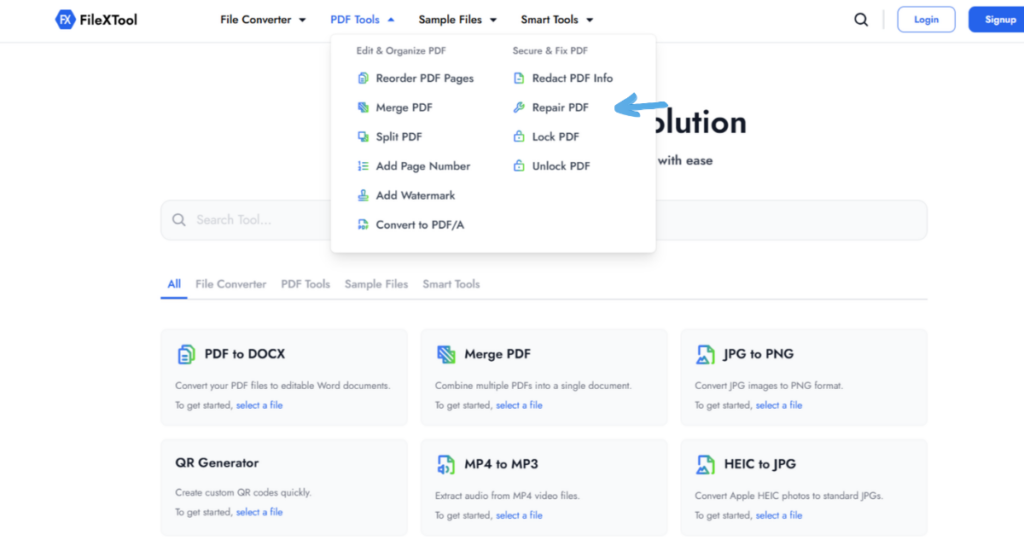
Visit the official FileXTool PDF repair page in your browser.
Use the online repair pdf tool here:
The tool works directly online, so there is no need to install any software.
Step 2: Upload the Corrupted PDF File
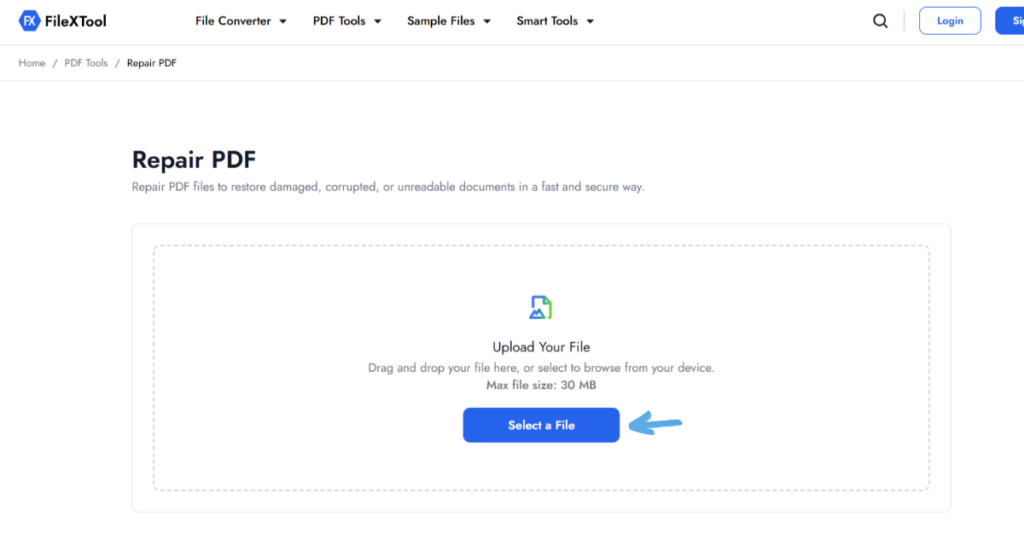
Click the upload button and select the damaged PDF file from your device.
The tool supports:
- Reports
- Contracts
- Invoices
- Ebooks
- Office documents
- Marketing PDFs
Once uploaded, the system automatically scans the file for corruption issues.
Step 3: Start the Repair Process
Click the “Repair PDF” button to begin the recovery process.
The system analyzes:
- Broken file structure
- Missing data blocks
- Corrupted formatting
- Damaged text layers
The repair process usually takes only a few seconds depending on the file size.
Step 4: Preview the Fixed File
Once repaired, preview the restored document to ensure:
- Pages display correctly
- Text is visible
- Images load properly
- Formatting looks normal
This helps verify that the repair process was successful.
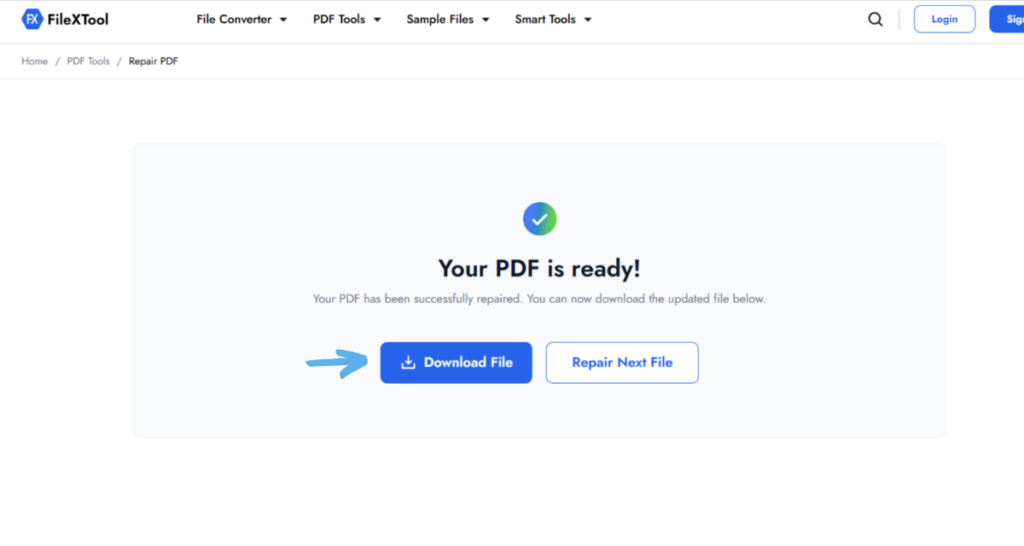
Step 5: Download the Repaired PDF
Finally, download the repaired PDF file to your device.
Your document should now open properly without corruption errors.
Using a reliable pdf repair toolbox like FileXTool can save hours of manual recovery work.
Common Signs Your PDF File Needs Repair
Sometimes PDF corruption is obvious. Other times the signs are more subtle.
Here are the most common indicators that your file may need repair.
PDF Will Not Open
The file refuses to open in Adobe Acrobat or other PDF readers.
Blank Pages
The document opens, but pages appear completely empty.
Missing Images or Text
Parts of the content disappear or fail to load correctly.
Error Messages
You may see errors like:
- “PDF file is damaged”
- “Unable to read document”
- “Invalid PDF structure”
Extremely Slow Loading
Damaged PDFs often take much longer to open than normal documents.
Crashing PDF Reader
Some corrupted files can cause PDF software to freeze or crash repeatedly.
If you notice these signs, using the best pdf repair tool immediately can help prevent further file damage.
Best Ways to Prevent PDF Corruption
Preventing corruption is always easier than repairing damaged files later.
Here are some simple but effective prevention tips.
Use Trusted Storage Devices
Store important PDFs on reliable drives and cloud platforms.
Avoid Interrupted Downloads
Ensure stable internet connections while downloading large PDF files.
Keep Backup Copies
Always save backup copies of important documents.
Update PDF Software Regularly
Using updated software reduces compatibility issues and file corruption risks.
Use Strong Password Protection
Password-protected documents are safer from unauthorized modifications and malware attacks.
You can also read our detailed guide on:
how to create a strong password
Scan Devices for Malware
Regular antivirus scans help prevent malicious file corruption.
Following these practices greatly reduces the chances of document damage.
Why FileXTool is the Best PDF Repair Tool
There are many online recovery tools available, but not all of them provide safe and reliable repairs.
FileXTool stands out because it combines speed, simplicity, and security in one platform.
Key Advantages of FileXTool
Beginner-Friendly Interface
No technical skills required.
Online Access
Repair PDFs directly from your browser without software installation.
Fast Recovery
Most files are repaired within minutes.
Secure Processing
Your uploaded documents remain protected during the repair process.
Supports Multiple PDF Types
Works with:
- Reports
- Contracts
- Ebooks
- Office files
- Marketing PDFs
This makes FileXTool one of the best pdf repair tool options for everyday users and businesses alike.
Its advanced pdf repair toolbox helps restore damaged files while maintaining document quality and formatting.
Pro Tips to Repair PDF Files Successfully
Repairing PDF files becomes easier when you follow the right practices.
Pro Tips
Always Keep Backup Copies
Never work directly on your only copy of a damaged PDF.
Repair Before Editing
Fix the file first before attempting further edits.
Use Trusted Repair Tools
Avoid unsafe websites that may compromise your files.
Scan for Malware
Viruses can continue damaging repaired documents if not removed.
Test the Repaired File
Always verify the repaired PDF on multiple devices or readers.
Common Mistakes to Avoid
Overwriting the Original File
Always save repaired PDFs separately.
Using Unknown Software
Unsafe repair tools may damage files further.
Ignoring Early Warning Signs
Fixing minor corruption early prevents complete file loss.
Following these tips improves recovery success and protects your important documents.
Conclusion
Corrupted PDF files can be frustrating, especially when important reports, invoices, presentations, or business documents suddenly become inaccessible. Fortunately, most PDF corruption problems can be fixed quickly using a reliable repair pdf tool.
Whether the issue comes from interrupted downloads, software crashes, malware attacks, or damaged storage devices, using a trusted pdf repair toolbox helps restore your files safely without requiring advanced technical skills.
FileXTool simplifies the entire repair process with a fast, secure, and beginner-friendly solution that works directly online. Instead of wasting time searching for complicated recovery methods, you can repair damaged PDF files in just a few clicks.
Ready to recover your file?
Use FileXTool now and repair your PDF in minutes with one of the best pdf repair tool solutions available online today.
FAQs
Q1: What is a repair pdf tool?
A repair pdf tool is software or an online utility designed to fix damaged or corrupted PDF files. It repairs broken file structures, restores missing content, and helps users reopen inaccessible documents. These tools are commonly used when PDF files show errors, blank pages, or fail to open properly in PDF readers.
Q2: Can corrupted PDF files be repaired?
Yes, many corrupted PDF files can be repaired successfully using a reliable pdf repair toolbox. Modern repair tools scan damaged file structures and recover readable content, images, formatting, and pages. The success rate depends on the severity of the corruption, but most minor and moderate PDF issues can usually be fixed quickly.
Q3: Which is the best pdf repair tool?
The best pdf repair tool should be fast, secure, easy to use, and capable of recovering damaged documents without losing important formatting. FileXTool is a strong option because it works online, requires no installation, supports multiple document types, and provides a beginner-friendly repair process within just a few minutes.
Q4: Is FileXTool PDF repair safe?
Yes, FileXTool uses secure processing systems to help protect uploaded documents during the repair process. Files are processed online without requiring software installation, reducing security risks for users. It is always recommended to use trusted repair platforms instead of unknown third-party tools that may compromise document privacy or data safety.
Q5: Why do PDF files get corrupted?
PDF files become corrupted due to interrupted downloads, malware attacks, storage errors, software crashes, incomplete file transfers, or damaged hard drives. In some cases, outdated PDF readers may also create compatibility problems. Regular backups, stable storage systems, and secure file handling practices help reduce the chances of PDF corruption significantly.