


Weak passwords are one of the most common reasons online accounts get hacked. Many people still use simple passwords like names, birthdays, or easy number combinations, which makes accounts easier to access through guessing or automated attacks.
Learning how to create a strong password helps protect personal information, emails, banking accounts, social media profiles, and work-related data. A strong password adds an extra layer of security and reduces the risk of unauthorized access.
Today, most websites and apps recommend longer and more complex passwords because cyber threats continue to grow. Understanding the best way to create a password can help improve online safety while making your accounts harder to compromise.
Steps to Generate Password
If you are learning how to create a strong password, using a password generator can make the process faster and more secure. Modern password tools help create random combinations that are harder to guess compared to manually created passwords.
Step 1: Open the FileXTool Website
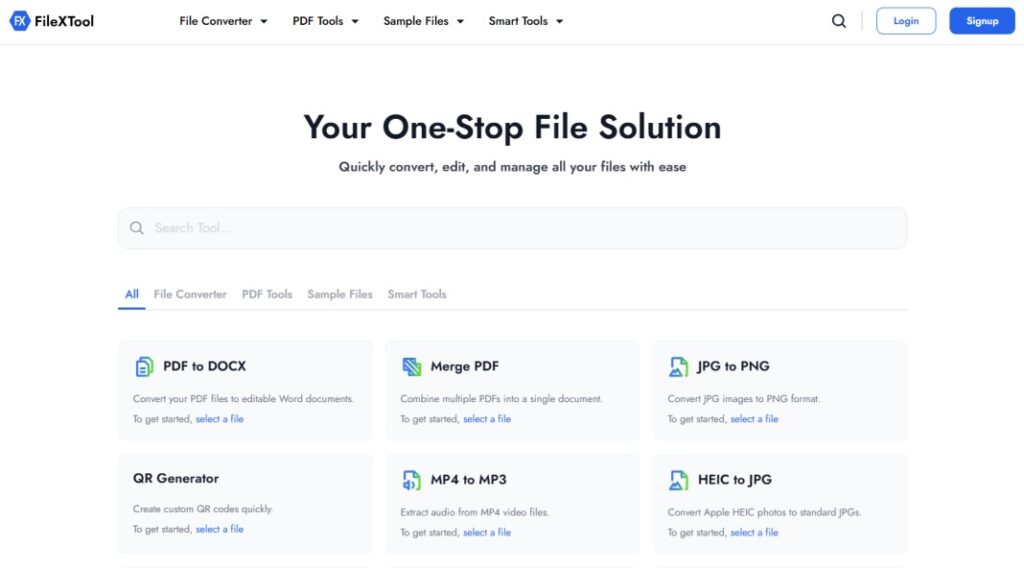
Visit the FileXTool website using your browser to access its online utility features and password-related tools.
Step 2: Go to the Smart Tools Section and Select Password Generator
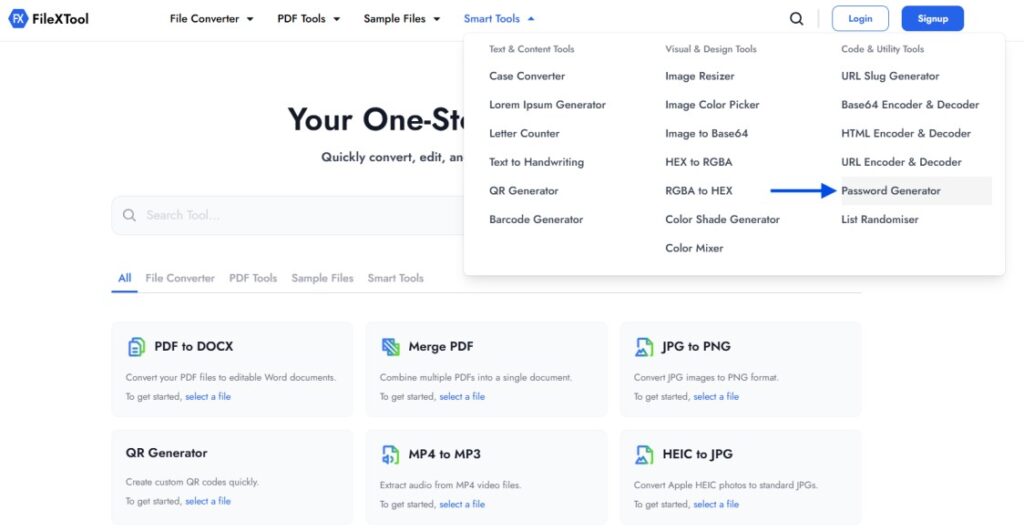
Open the smart tools section and choose the password generator tool. This tool helps users generate secure passwords with customizable settings based on their security needs.
Step 3: Choose the Password Length
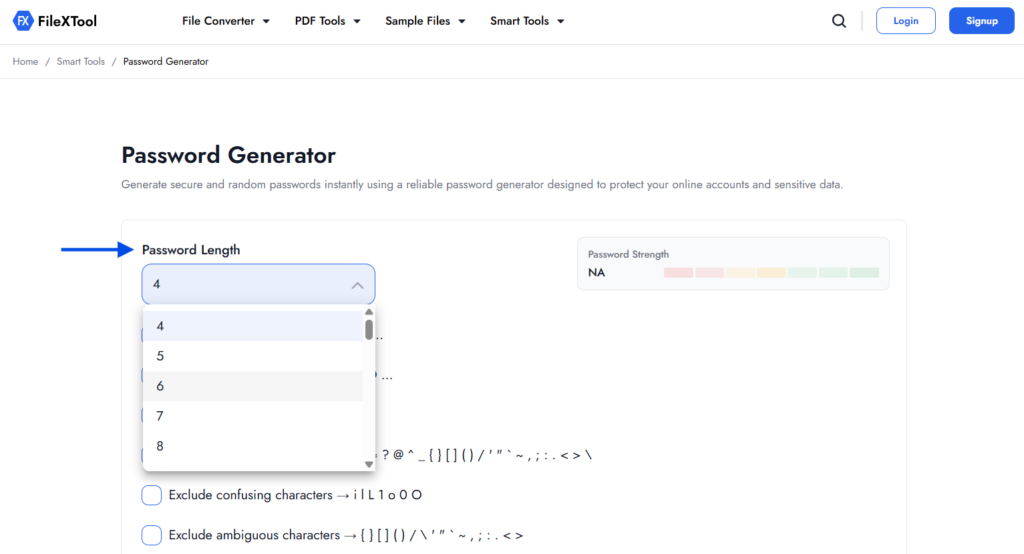
Select the desired password length from the dropdown menu. Longer passwords are generally considered more secure because they increase complexity and reduce predictability.
Step 4: Select the Characters You Want to Include
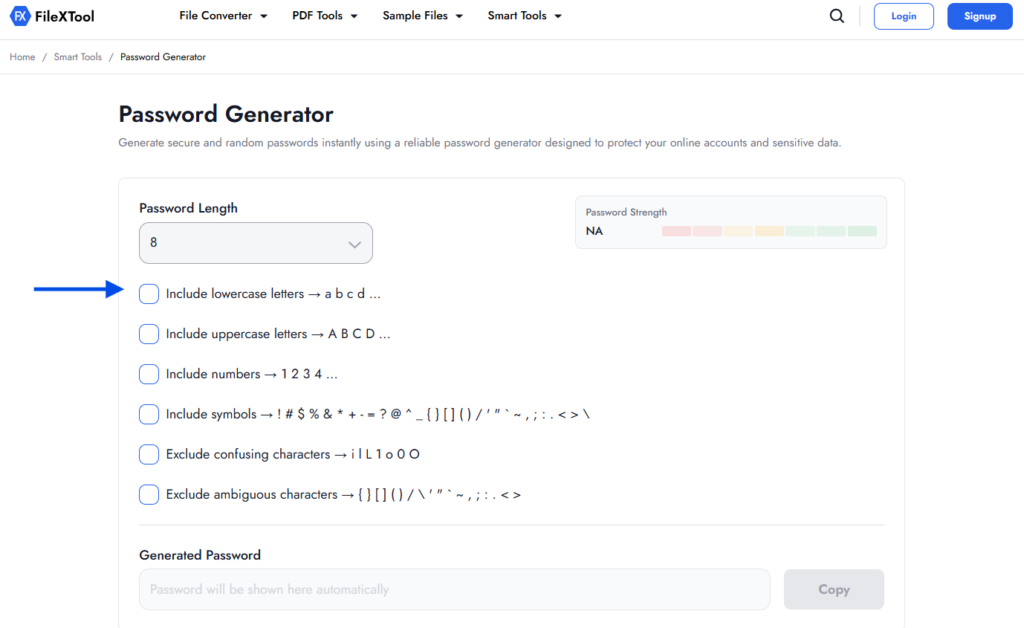
Choose the options you want in the password, such as lowercase letters, uppercase letters, numbers, and symbols. You can also exclude confusing or ambiguous characters to make passwords easier to read when needed.
Step 5: Copy the Generated Password
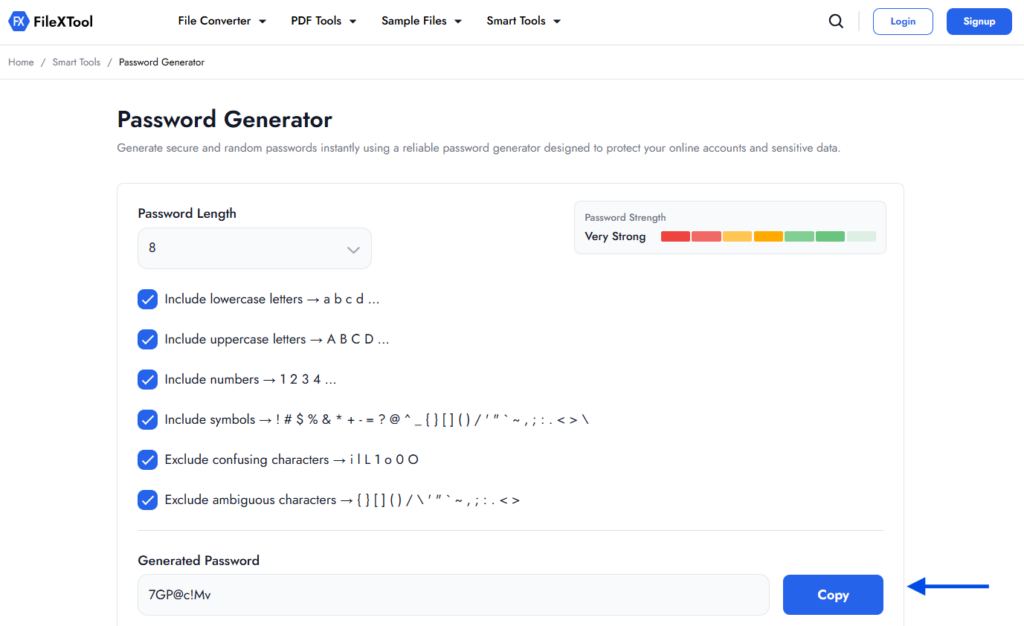
After selecting your settings, the tool automatically creates a secure password. Copy the generated password and save it safely for your account or application.
What Makes a Password Strong?
A strong password is usually long, unique, and difficult to guess. Security experts generally recommend using a mix of uppercase letters, lowercase letters, numbers, and special symbols instead of simple words or predictable patterns.
Password length also plays an important role in online security. Short passwords can often be cracked more easily, while longer combinations create stronger protection against automated attacks and password guessing attempts.
The best way to create a password is to avoid personal details such as names, birthdays, phone numbers, or common words. Many users now rely on a strong random password generator to create secure combinations that are harder to predict and safer for online accounts.
Tips for Creating Strong Passwords
Understanding how to create a strong password becomes much easier when you follow a few simple security practices. Small improvements in password habits can significantly reduce the chances of unauthorized account access.
- Use Longer Passwords
Passwords with more characters are generally harder to crack. Using at least 12–16 characters can improve overall account security.
- Mix Different Character Types
Combine uppercase letters, lowercase letters, numbers, and symbols to create stronger and less predictable passwords.
- Avoid Personal Information
Do not use names, birthdays, phone numbers, or common words that others can easily guess.
- Use Different Passwords for Every Account
Reusing the same password across multiple platforms increases security risks if one account gets compromised.
- Store Passwords Securely
Keep passwords in a trusted password manager or secure storage system instead of saving them openly in notes or messages.
- Use a Password Generator When Needed
A strong random password generator can help create secure combinations that are difficult to predict manually.
Common Password Mistakes to Avoid
Even users who understand how to create a strong password sometimes make small mistakes that weaken account security and increase the risk of unauthorized access.
- Using the same password across multiple accounts
- Creating very short or simple passwords
- Using predictable patterns like “123456” or “password”
- Adding personal details such as names or birthdays
- Saving passwords openly in notes or messages
- Sharing passwords through insecure platforms
- Using only letters without numbers or symbols
- Avoiding password updates for long periods
Strong Password Examples
Many users understand password rules but still struggle to create secure combinations manually. Looking at a few strong password examples can help explain how secure passwords are usually structured.
| Password Example | Why It Is Strong |
|---|---|
| T9#kL2!vQ7@p | Uses uppercase, lowercase, numbers, and symbols |
| Rm$4xP8InL2q | Random structure with no predictable words |
| G7@zQ1#mV9!x | Long combination with mixed character types |
| N5!rK8@tY3#p | Difficult to guess using common attack methods |
| qR7!vL2#xP9@ | Balanced complexity and randomness |
The safest passwords are usually long, random, and unique for every account. This is one reason many users prefer using a strong random password generator instead of creating passwords manually.
Why You Should Use Different Passwords for Every Account
Using the same password across multiple platforms may seem convenient, but it can create major security risks. If one account gets exposed during a data breach, attackers often try the same password on other websites and apps.
Reduces the Risk of Multiple Account Breaches
When every account has a different password, a single leaked password cannot easily compromise your other accounts. This adds an extra layer of protection for emails, banking apps, and social media profiles.
Improves Overall Online Security
Learning how to create a strong password is important, but using unique passwords makes your security strategy much stronger. It becomes harder for attackers to access multiple accounts through reused credentials.
Protects Personal and Professional Information
Different passwords help keep sensitive information safer across work accounts, shopping platforms, cloud storage, and personal services. Even simple password management habits can significantly improve digital security.
How Password Generators Improve Online Security
Creating secure passwords manually can sometimes lead to predictable combinations or repeated patterns. This is why many users now rely on a strong random password generator to create passwords that are more difficult to guess or crack.
Creates More Random Password Combinations
Password generators use random combinations of letters, numbers, and symbols instead of predictable words or personal information. This helps improve password strength and reduces common security risks.
Helps Save Time and Improve Security
Instead of thinking of passwords manually for every account, users can generate secure combinations instantly. This makes it easier to maintain stronger password habits across multiple platforms.
Supports Better Digital Safety Practices
Many online utility platforms now include password tools alongside features such as How to Generate Barcode Online and How to Generate QR Code to help users manage different digital tasks more efficiently and securely.
When Should You Change Your Password?
Knowing how to create a strong password is important, but updating passwords at the right time also plays a major role in maintaining account security.
- After a website or service reports a data breach
- If you notice suspicious login activity on your account
- When you accidentally share your password with someone
- If you have reused the same password across multiple platforms
- After logging into accounts on public or shared devices
- When your current password is weak, old, or easy to guess
Final Thoughts
Strong passwords have become an important part of everyday online safety. From email accounts and banking apps to social media and work platforms, secure passwords help protect sensitive information from unauthorized access and common cyber threats.
Understanding how to create a strong password is not only about adding symbols or numbers. It also involves using unique combinations, avoiding predictable patterns, and maintaining better password habits across different accounts.
For users who regularly work with online utility features and security-related tools, platforms like FileXTool can also help simplify tasks such as password generation and other everyday digital workflows in a more practical way.
FAQs
1. What is the best way to create a password?
The best way to create a password is to use a long and unique combination of uppercase letters, lowercase letters, numbers, and symbols. Avoid using personal information or common words that are easy to guess.
2. How do I create a very strong password?
If you want to learn how to create a strong password, focus on using at least 12–16 characters with a random mix of letters, numbers, and symbols. Many users also prefer password generators for creating more secure combinations.
3. Are password generators safe to use?
Yes, trusted password generators are generally safe because they create random combinations that are harder to predict manually. A strong random password generator can help improve online security for different accounts and platforms.
4. What are some strong password examples?
Examples of strong passwords include combinations like R7@pL9#xT2!m or Q4$vN8!kY1@z. Strong passwords are usually long, random, and difficult to guess.
5. How often should I change my password?
You should change your password if you notice suspicious activity, experience a data breach, or use the same password across multiple accounts. Updating passwords regularly can help improve account security.