


Need a video for testing but don’t want to use personal footage? Looking for a quick MP4 file to test uploads, streaming quality, or website performance?
You’re not alone. Developers, QA testers, students, designers, content creators, and businesses frequently need video files for testing purposes. Creating videos from scratch every time can be time-consuming and unnecessary.
This is where a sample video file becomes valuable. Instead of recording or downloading random videos, you can use pre-built testing files in different formats, resolutions, and sizes. These files help test software, applications, websites, streaming platforms, and multimedia tools quickly and efficiently.
In this guide, you’ll learn what sample video files are, why they’re important, how they are used across industries, and how to download sample MP4 files for your testing requirements.
What Is a Sample Video File?
A sample video file is a pre-created video used for testing, development, learning, and quality assurance purposes. These files are designed to help users evaluate how videos behave in different environments without using personal or copyrighted content.
Sample videos are available in multiple formats, including:
- MP4
- AVI
- MOV
- MKV
They also come in different resolutions and file sizes, making them ideal for various testing scenarios.
Whether you’re building a video-sharing platform, testing upload functionality, validating a media player, or learning video editing, a sample video file provides a reliable and consistent resource.
Unlike real-world videos, sample files are specifically created to help users test systems efficiently while maintaining consistency across different environments.
Why Do People Use Sample Video Files?
Sample video files are widely used because they eliminate the need to create custom content for testing.
Testing Video Players
Developers use sample files to verify that video players support different formats and resolutions correctly.
Testing Upload Systems
Websites that allow video uploads must ensure users can upload files successfully without errors.
Testing Streaming Platforms
Streaming services use video testing files to evaluate playback quality, buffering performance, and compatibility.
Learning Video Editing
Students and beginners often use sample video files for testing editing software and practicing multimedia workflows.
Testing File Converters
Many users test video conversion tools using sample files before processing important content.
A sample video file for testing saves time, improves consistency, and helps identify problems before real users encounter them.
Common Use Cases of Sample Video Files
Sample videos are used across many industries and professions.
Developers
Developers use sample files to:
- Test upload functionality
- Validate media playback
- Check browser compatibility
- Verify video processing systems
QA Teams
Quality assurance teams rely on sample files to:
- Test applications
- Detect playback issues
- Validate software updates
- Confirm device compatibility
Content Creators
Creators often test:
- Video quality
- Compression settings
- Export formats
- Streaming performance
Students
Students use sample videos for:
- Multimedia projects
- Learning video editing
- Academic research
- Software testing exercises
Businesses
Organizations frequently use video testing files for:
- Employee training platforms
- Internal applications
- Marketing systems
- Streaming infrastructure
Using sample videos provides a controlled environment for testing without risking important production content.
Types of Sample Video Files Available
Different formats serve different purposes.
MP4
MP4 is the most commonly used video format worldwide.
Advantages:
- Excellent compatibility
- Small file size
- High quality
- Supported on almost every device
Best For:
- Websites
- Mobile devices
- Streaming platforms
- Software testing
AVI
AVI is an older video format still used in certain systems.
Advantages:
- Good quality
- Broad software support
Disadvantages:
- Larger file sizes
Best For:
- Legacy systems
- Desktop applications
MOV
MOV is Apple’s multimedia format.
Advantages:
- High quality
- Great editing support
Best For:
- Mac users
- Professional editing
MKV
MKV supports advanced multimedia features.
Advantages:
- High-quality playback
- Multiple audio tracks
Best For:
- Media servers
- High-definition content
For most users, MP4 remains the preferred option due to its balance of quality, compatibility, and performance.
How to Download Sample Video Files from FileXTool
If you’re looking to download sample video file resources quickly, FileXTool provides an easy solution.
Step 1: Open FileXTool
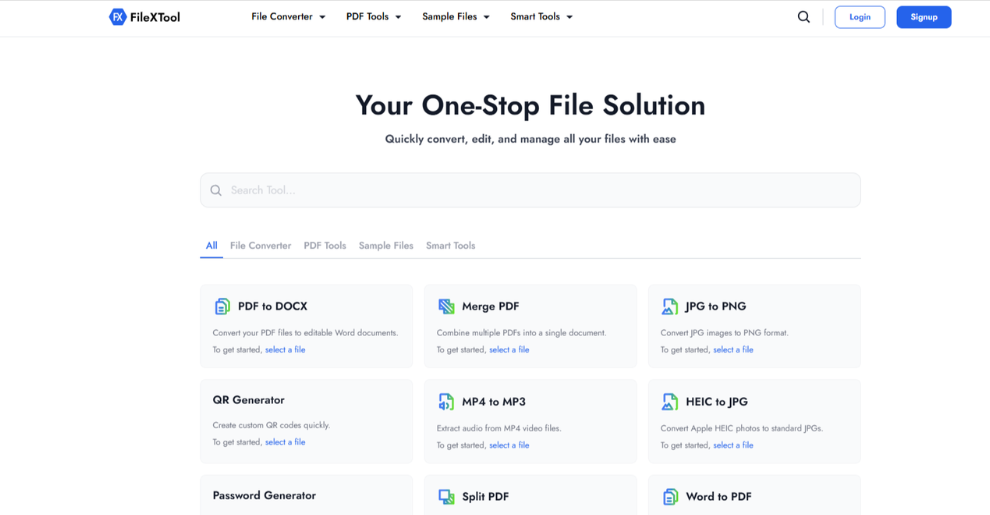
Visit the FileXTool website using your preferred browser.
Step 2: Navigate to the Sample Files Section
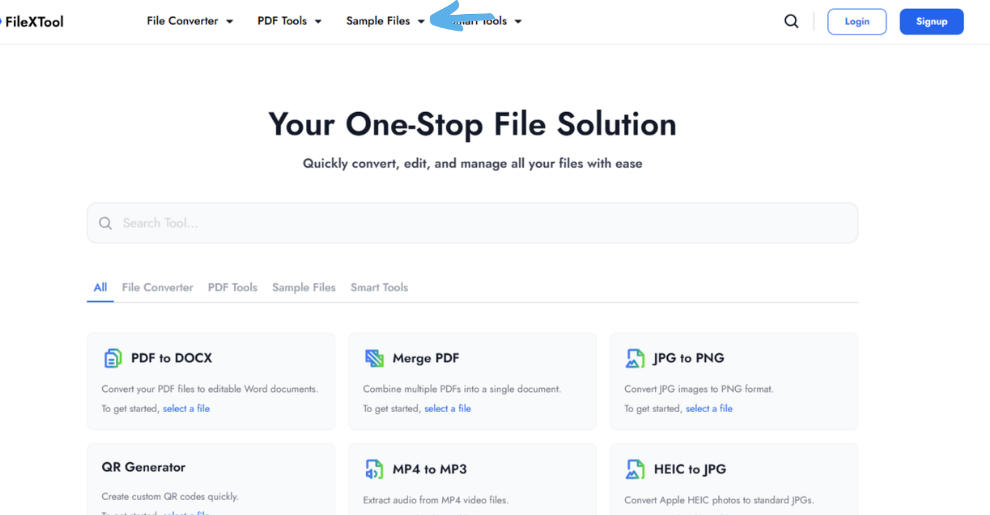
Open the sample files category and locate video files.
Step 3: Choose Your Preferred Format
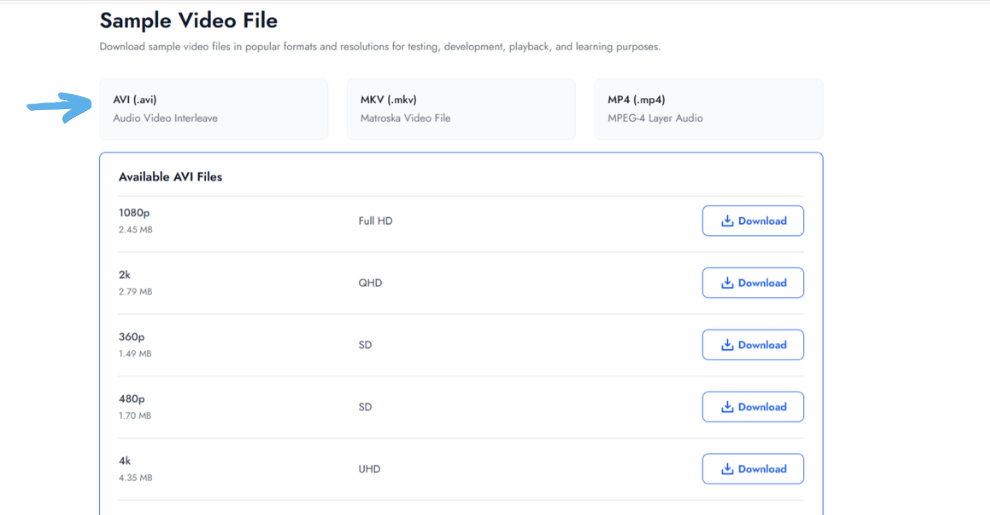
Select the format you want to test, such as:
- MP4
- AVI
- MOV
- MKV
Step 4: Select File Size
Choose a file size based on your testing requirements.
Examples include:
- Small files for upload testing
- Medium files for application testing
- Large files for performance evaluation
Step 5: Download the File
Use the download sample video file resource here:
Benefits of Using Sample Video Files
Using sample videos offers several advantages.
Saves Time
No need to create videos manually for every test scenario.
Improves Testing Consistency
Using the same file across multiple tests helps produce reliable results.
Supports Multiple Environments
A single file can be used across:
- Websites
- Mobile apps
- Desktop software
- Streaming platforms
Reduces Privacy Risks
Unlike personal videos, sample files contain no sensitive information.
Faster Troubleshooting
Problems can be reproduced more easily using consistent test files.
Many professionals also use sample audio video files together when testing complete multimedia workflows.
Best Practices for Using Sample Video File
Pro Tips
Test Multiple Resolutions
Verify performance across:
- 720p
- 1080p
- 4K
Use Different File Sizes
Testing only small files may hide performance issues.
Validate Across Devices
Check functionality on:
- Desktop
- Mobile
- Tablet
Test Various Formats
Different formats may behave differently in your system.
Common Mistakes
Using Only One File Size
This limits testing accuracy.
Ignoring Mobile Devices
Mobile performance often differs from desktop performance.
Skipping Format Testing
Testing only MP4 may overlook compatibility problems.
Not Monitoring Performance
Track loading speed, buffering, and playback quality during tests.
Sample Video Files for Testing Websites & Applications
One of the most important uses of a sample video file for testing is evaluating website and application performance.
Upload Testing
Verify upload limits and error handling.
Performance Testing
Measure loading speed and system responsiveness.
Video Player Testing
Ensure controls, playback, and subtitles work correctly.
Streaming Testing
Evaluate buffering and streaming quality under different conditions.
CDN Validation
Confirm that content delivery networks distribute video files efficiently.
These tests help improve user experience and identify technical issues before deployment.
Video files often work alongside audio files in multimedia projects.
To better understand how audio formats affect compatibility and performance, read our guide on Audio File Formats Understanding both audio and video formats helps create more efficient multimedia workflows.
Conclusion
Sample video files have become essential resources for developers, testers, students, content creators, and businesses. They simplify testing workflows, improve consistency, reduce privacy concerns, and help identify technical issues before real users encounter them.
Whether you’re testing uploads, validating media players, checking streaming performance, or learning multimedia concepts, a reliable sample MP4 file can save significant time and effort while improving overall software quality.
Ready to get started? Visit FileXTool at and access free testing resources, sample files, and practical tools that help streamline your development and testing workflows. Download your sample video file today and start testing smarter.
FAQs
What is a sample video file?
A sample video file is a pre-created video used for testing, learning, development, and quality assurance purposes. It allows developers, students, businesses, and content creators to test software, websites, media players, and upload systems without using personal or production video content.
Where can I download sample video file resources?
You can download sample video file resources from dedicated testing platforms such as FileXTool. These files are available in multiple formats, resolutions, and sizes, making them suitable for website testing, software validation, upload checks, streaming evaluations, and multimedia learning projects.
Why are sample video files used for testing?
Sample video files provide consistent and reusable content for testing applications, websites, streaming platforms, and video players. They help identify compatibility issues, performance bottlenecks, upload limitations, and playback problems while eliminating the need to create new videos for every test scenario.
Which format is best for testing videos?
MP4 is generally considered the best format for testing because it offers excellent compatibility across devices, browsers, operating systems, and software applications. It also provides a strong balance between file size, quality, and performance, making it ideal for most testing environments.
Are sample video files free to use?
Many sample video files are available for free and are specifically created for educational, testing, and development purposes. However, users should always review usage terms before using files in commercial projects or public-facing applications to ensure compliance with licensing requirements.