


Choosing between an SVG vs EPS file can be confusing, especially when your website performance, design quality, or print results depend on the format you choose. Many designers and businesses struggle to decide whether the SVG file format is better for websites or if the EPS file format is the right choice for professional printing. Using the wrong format can lead to blurry graphics, unsupported files, slow loading pages, or printing issues.
The confusion grows even more when resizing logos or using an svg file converter or eps file converter for compatibility. In this guide, you’ll learn the key differences between SVG and EPS, when to use each format, and how to choose the best option for your project.
What is SVG File Format?
The svg file format is a vector-based image format mainly used for websites, apps, logos, icons, and digital graphics. SVG stands for Scalable Vector Graphics, which means the image can be resized without losing quality. Unlike JPG or PNG files, SVG images remain sharp and clear on every screen size.
One of the biggest advantages of the svg file format is that it is lightweight and web-friendly. Since SVG files are XML-based, developers and designers can easily edit, customize, and optimize them for responsive websites and modern digital platforms.
Modern browsers like Chrome, Firefox, Safari, and Edge support SVG files directly, making them one of the most popular formats for online graphics and UI design.
Key Benefits of SVG File Format
- Scales without losing quality
- Lightweight and fast-loading
- SEO and web-performance friendly
- Supports transparency and animations
- Works perfectly on responsive websites
- Easy to edit using code or design tools
Because of these advantages, the svg file format is widely used in modern web development and digital branding. If you ever need better compatibility for printing or professional design software, you can easily use a reliable svg file converter to convert SVG files into formats like EPS.
What is EPS File Format?
The EPS file format (Encapsulated PostScript) is a professional vector graphics format mainly used for printing and high-quality design projects. Unlike JPG or PNG files, EPS stores graphics using vector paths, allowing designs to scale without losing quality.
Because of this, EPS files are commonly used for logos, packaging, banners, and large print materials. The eps file format also works well with professional design software like Adobe Illustrator and CorelDRAW, making it a trusted choice in the printing industry.
One major advantage of EPS is its ability to maintain sharp graphics and accurate colors even at large sizes. However, unlike the svg file format, EPS files are not browser-friendly and usually require dedicated software to open or edit.
If your project is focused on commercial printing or professional branding, EPS remains one of the most reliable vector formats available.
SVG vs EPS File: Key Differences
When comparing svg vs eps files, the biggest difference comes down to where and how you plan to use the graphic. Both are vector-based formats, which means they can scale without losing quality, but each format is designed for a different purpose.
The svg file format is mainly built for websites, apps, and digital interfaces. It is lightweight, web-friendly, and supported by almost all modern browsers. Designers and developers prefer SVG files because they load faster and work perfectly for responsive web design, icons, UI elements, and animations.
On the other hand, the eps file format is widely used in professional printing and high-end graphic design workflows. EPS files are compatible with advanced design software like Adobe Illustrator and CorelDRAW, making them ideal for print-ready logos, banners, packaging, and marketing materials.
Here’s a quick comparison table to understand the differences more clearly:
| Feature | SVG | EPS |
|---|---|---|
| Use Case | Web | |
| Compatibility | Browsers | Design Software |
| File Size | Small | Large |
| Editability | Easy | Requires Software |
In short, if your focus is digital performance and website speed, SVG is usually the better option. But if you need professional print quality and advanced editing support, EPS remains a strong choice. Many designers even use both formats together and rely on a reliable svg file converter or eps file converter whenever compatibility becomes an issue.
When Should You Use SVG vs EPS File?
Choosing between an SVG vs EPS file depends on where and how you plan to use your design. Both are vector formats, but they serve very different purposes. The svg file format is best for digital platforms, while the eps file format is more suitable for professional printing and large-scale design work.
Use SVG When:
You should use the svg file format when working on:
- Websites
- Mobile apps
- UI/UX design
- Icons and logos for web
- Social media graphics
SVG files are lightweight, scalable, and supported by almost all modern browsers. This makes them ideal for responsive websites because they maintain quality without increasing loading speed. Another major advantage is that SVG files can be edited easily using code or design tools.
Many developers and designers also prefer SVG because it improves website performance and SEO by reducing file size.
However, one common problem is that SVG files may not open properly in older design software or print-focused applications. In such cases, using a reliable svg file converter can help you quickly change the format for better compatibility.
Use EPS When:
The eps file format is the better choice for:
- Professional printing
- Large banners and posters
- Packaging design
- Logo printing
- High-resolution commercial graphics
EPS files are widely used in print industries because they preserve design quality and work smoothly with software like Adobe Illustrator and CorelDRAW. Unlike SVG, EPS is optimized for print workflows and color accuracy.
The downside is that EPS files are not supported by browsers. If you try opening an EPS file on a website, it usually will not display correctly. This is one of the biggest reasons users rely on an eps file converter or convert EPS into SVG for online use.
In short, when comparing svg vs eps file, SVG is best for digital projects, while EPS remains the preferred format for professional printing and production work.
How to Convert SVG to EPS File (Step-by-Step)
Need to convert an SVG file into EPS format without losing quality or compatibility? Whether you are preparing a logo for professional printing, sending vector artwork to a client, or working with older design software, converting SVG to EPS is often the best solution. The good news is that you do not need advanced design skills or expensive software to do it.
With a reliable svg to eps converter, you can complete the entire process online in just a few clicks. FileXTool makes the conversion fast, beginner-friendly, and secure while preserving the quality of your vector graphics.
Follow these exact steps below to convert your file easily.
Step 1: Open FileXTool
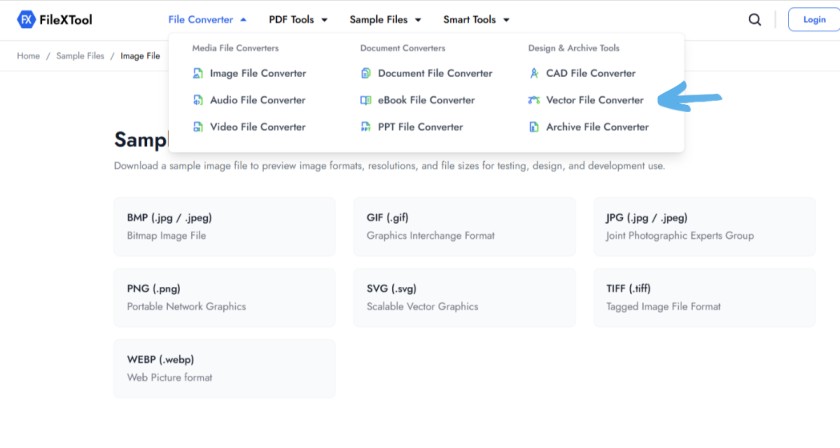
Go to the FileXTool website using any modern browser like Chrome, Firefox, Safari, or Edge. The platform works smoothly on both desktop and mobile devices, so you can convert files from anywhere.
FileXTool is designed specifically for fast and secure file conversions, making it a trusted choice for designers, developers, and print professionals looking for an efficient eps file converter.
Step 2: Select SVG as Input
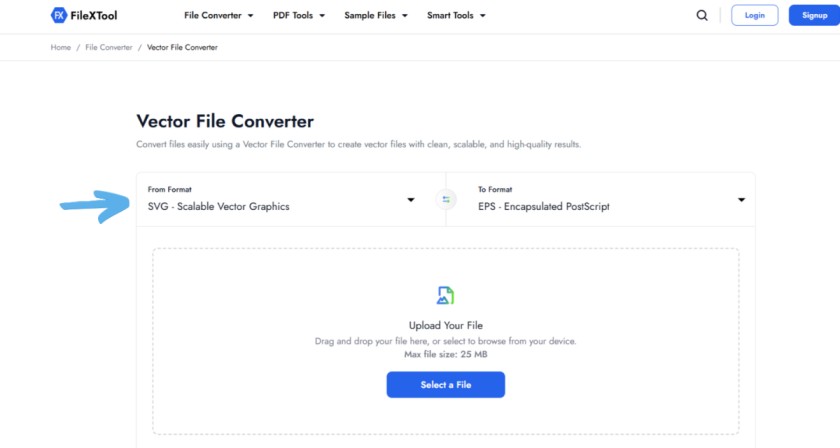
Once you open the converter page, choose SVG as your input format. The svg file format is commonly used for websites, UI design, icons, and scalable graphics because it stays sharp at any size.
Selecting the correct input format ensures your vector layers and design structure remain intact during conversion.
Step 3: Choose EPS as Output
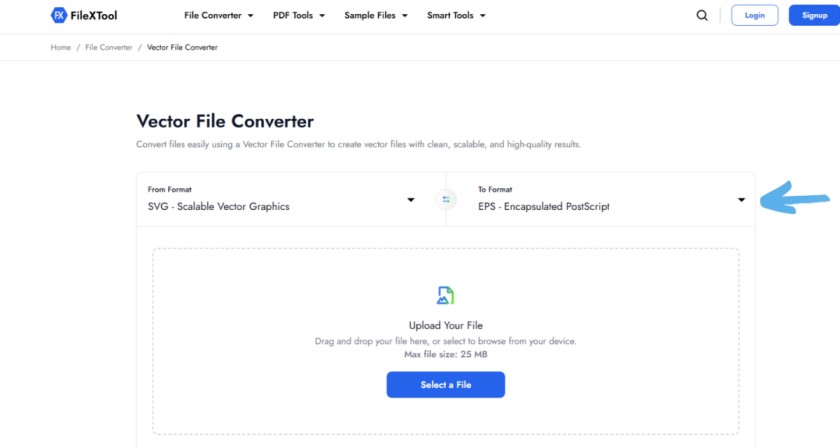
Now select EPS as the output format. The eps file format is widely used in professional printing, branding, logo design, and publishing workflows because of its strong compatibility with design software like Adobe Illustrator and CorelDRAW.
This step is important because converting svg vs eps file formats correctly helps maintain vector quality for print-ready projects.
Step 4: Upload Your File
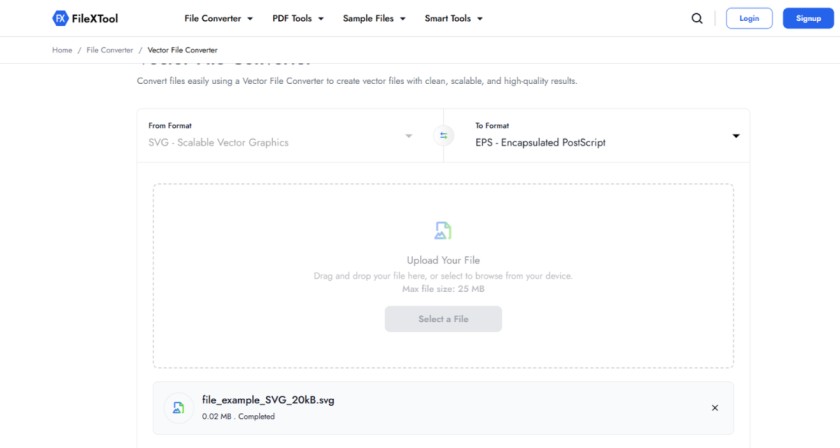
Click the upload button or drag and drop your SVG file directly into the converter. FileXTool supports quick uploads and processes vector files securely.
Whether you are converting a simple icon or a complex illustration, the platform handles the conversion smoothly without reducing image quality.
Use this free svg to eps converter to start your conversion instantly.
Step 5: Click Convert
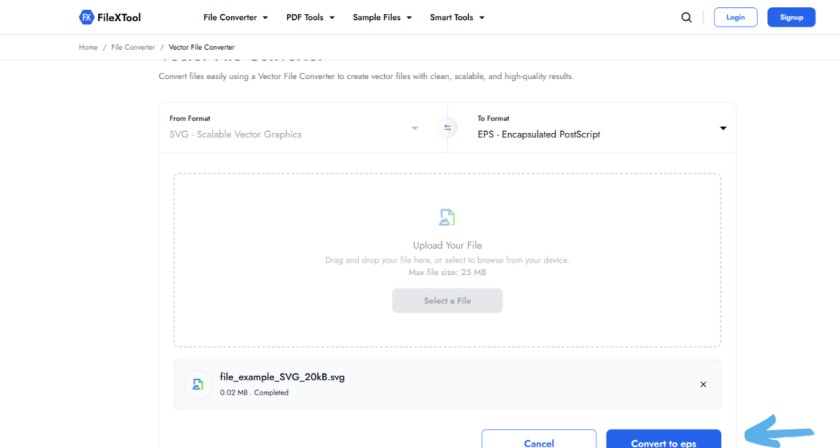
After uploading the file, click the “Convert” button. The tool will automatically process the conversion from svg file format to EPS while preserving scalability and vector accuracy.
Unlike low-quality converters, FileXTool minimizes formatting issues and ensures the final EPS file works properly in supported design applications.
Step 6: Download the File
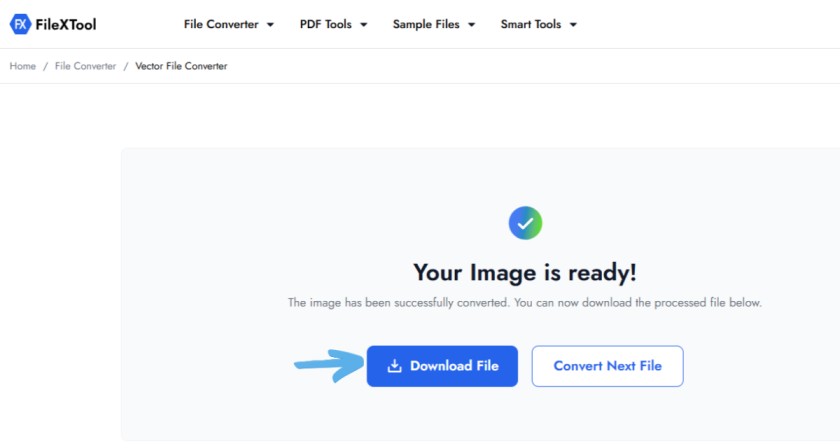
Once the conversion is complete, download your new EPS file instantly. You can now use it for professional printing, logo design, packaging, or advanced editing workflows.
For designers comparing svg vs eps file formats, this conversion process provides the flexibility to use the same artwork across both web and print environments without recreating the design from scratch.
Pro Tip:
Always keep both SVG and EPS versions of important graphics. SVG works best for websites and digital interfaces, while EPS remains the preferred format for print production and professional design software.
Pro Tips to Choose the Right File Format
Choosing between svg vs eps file doesn’t have to be confusing if you understand where each format works best. Both formats serve different purposes, and using the right one at the right time can save you a lot of effort, compatibility issues, and quality problems.
Always use SVG for web
The svg file format is built for the web. It’s lightweight, scalable, and supported by all modern browsers. Whether you’re adding icons, logos, or illustrations to a website, SVG ensures fast loading and sharp visuals on every screen size. If your goal is performance and flexibility, SVG is the smarter choice.
Use EPS for print
The eps file format is ideal for printing and professional design work. Designers often rely on EPS files when creating logos, brochures, or large-scale prints because they maintain high quality without losing detail. If you’re working with printers or design software like Illustrator, EPS is usually preferred.
Keep both formats
One of the smartest decisions is to maintain both versions of your file. Many professionals work with both svg vs eps file formats depending on the project. Keeping both ensures you’re always ready—whether it’s for a website update or a print requirement.
Convert when needed
Sometimes you may only have one format available. In such cases, using a reliable svg file converter or eps file converter helps you switch formats without starting from scratch. This is especially useful when clients or tools require a specific format.
Common Mistakes to Avoid
- Using EPS on websites
EPS files are not supported by browsers, which means they won’t display properly online. This can break your design and affect user experience.
- Using SVG for print
While SVG is great for digital use, it’s not always ideal for professional printing workflows. Some print systems may not fully support SVG, leading to unexpected output issues.
Conclusion
Choosing between an SVG vs EPS file depends on your project needs. If you are working on websites, apps, or digital graphics, the svg file format is the better option because it is lightweight, scalable, and browser-friendly. However, if your focus is professional printing, packaging, or large-format designs, the eps file format remains the preferred industry standard.
For the best workflow, many designers keep both formats ready and convert them whenever needed. If you want a fast and reliable svg file converter, try FileXTool to convert SVG to EPS in seconds. It helps improve compatibility, maintain quality, and simplify your design process without requiring complex software.
FAQs
What is SVG vs EPS file?
SVG and EPS are both vector file formats used for scalable graphics, but they serve different purposes. SVG is mainly designed for websites, apps, and digital platforms because it is lightweight and browser-friendly. EPS, on the other hand, is widely used in professional printing and graphic design workflows where high-quality print output and software compatibility are important.
Which is better SVG or EPS?
The better format depends on your project needs. SVG is usually better for websites, responsive graphics, UI design, and digital content because it loads faster and scales perfectly. EPS is a better option for commercial printing, packaging, and professional design work because it is highly compatible with print-focused software and production systems.
Can I convert SVG to EPS easily?
Yes, you can easily convert SVG to EPS using an online svg file converter like FileXTool. The process is simple — upload your SVG file, choose EPS as the output format, click convert, and download the file. This helps improve compatibility with printing software and professional design tools that support EPS format.
Is EPS file format outdated in 2026?
Even though SVG has become more popular for web usage, the eps file format is still important in professional printing and branding industries. Many print shops, designers, and production companies continue using EPS because it maintains high-quality vector output and works well with traditional commercial printing workflows and professional graphic design software.
Which format is best for logo design?
Both SVG and EPS are excellent for logo design, but they are used in different situations. SVG works best for websites, apps, and digital branding because it is lightweight and responsive. EPS is better for printed logos, packaging, banners, and merchandise because it preserves quality during large-scale professional printing processes.