


Confused between JPG and PNG? You’re not alone. Whether you’re building a website, designing graphics, running an eCommerce store, or optimizing images for SEO, choosing the right format can directly impact your page speed, image quality, and even your Google rankings.
The debate around jpg vs png isn’t just technical—it’s practical. Should you prioritize smaller file sizes or better image quality? Should you use JPG for everything or switch to PNG for certain cases?
In this guide, you’ll learn the real jpg vs png difference, see practical examples, and understand exactly which format to use in 2026 based on your needs.
JPG vs PNG – Quick Comparison
File Size:
JPG files are smaller, while PNG files are larger.
Quality:
JPG has slightly reduced quality (lossy), whereas PNG offers high quality (lossless).
Compression:
JPG uses lossy compression. PNG uses lossless compression.
Transparency:
JPG does not support transparency. PNG supports transparency.
Best Use Cases:
JPG is best for photos, blogs, and web images.
PNG is ideal for logos, graphics, and transparent UI.
This quick jpg png file size comparison shows why choosing the right format matters for both performance and design.
What is JPG Format?
JPG (or JPEG) is one of the most commonly used image formats on the web. It uses lossy compression, which means some image data is removed to reduce file size.
When to Use JPG:
- Blog images
- Website banners
- Social media uploads
- Product photos
Benefits:
- Smaller file sizes (great for speed)
- Faster website loading
- Widely supported across all platforms
Pro Tip: If your priority is performance and speed, JPG is often the better option in the jpg vs png debate.
What is PNG Format?
PNG (Portable Network Graphics) is known for its high-quality images and support for transparency.
When to Use PNG:
- Logos
- Icons
- UI elements
- Images with transparent backgrounds
Benefits:
- Lossless quality (no data loss)
- Supports transparency
- Sharp and crisp graphics
PNG is ideal when visual quality matters more than file size.
JPG vs PNG Compression Explained
Understanding jpg vs png compression is key to making the right choice.
- JPG Compression (Lossy):
Reduces file size by removing some data → smaller size but slight quality loss - PNG Compression (Lossless):
Keeps all image data intact → higher quality but larger size
In simple terms:
- JPG = smaller + slightly lower quality
- PNG = larger + perfect quality
Mistake to Avoid: Using PNG for large photos can slow down your website significantly.
JPG PNG File Size Comparison (Real Example)
Let’s say you upload the same image in both formats:
- JPG file size: 250 KB
- PNG file size: 1.2 MB
That’s nearly 5x larger.
Impact on Website:
- Slower loading time
- Higher bounce rate
- Lower SEO rankings
This real-world jpg png file size comparison proves why JPG is preferred for web performance.
JPG vs PNG Difference (Detailed Breakdown)
Here’s a simple breakdown of the jpg vs png difference:
- JPG uses lossy compression, PNG uses lossless
- JPG files are smaller, PNG files are larger
- JPG doesn’t support transparency, PNG does
- JPG is best for photos, PNG is best for graphics
- JPG loads faster, PNG offers better clarity
This comparison helps you quickly decide based on your use case.
JPG or PNG – Which is Better for You?
Still wondering which is better: jpg or png which is better? Let’s break it down by use case:
For Bloggers:
Best Choice: JPG
- Faster loading
- Better SEO performance
For Designers:
Best Choice: PNG
- High-quality graphics
- Transparency support
For Developers:
Best Choice: Depends
- Use JPG for performance
- Use PNG for UI elements
For eCommerce:
Best Choice: Mixed
- JPG for product images
- PNG for logos
Avoid This Mistake: Don’t use PNG for everything—it can slow down your website.
When Should You Convert JPG to PNG?
There are situations where converting JPG to PNG makes sense.
Use PNG When:
- You need transparent backgrounds
- You’re designing logos or icons
- You want pixel-perfect quality
You can easily convert images using this tool:
jpg to png converter
Step-by-Step: How to Convert JPG to PNG
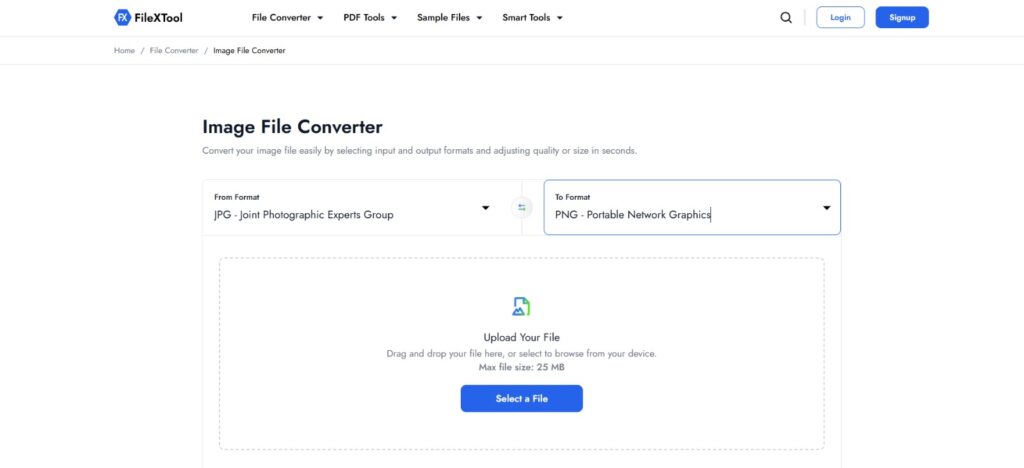
Here’s a simple process:
- Upload your JPG image
- Choose PNG format
- Click convert
- Download your file
If you want a detailed guide, check this helpful resource about how to convert jpg to png
JPG vs PNG
In 2026, image optimization is a major ranking factor.
Key SEO Insights:
- Page speed affects rankings
- Large images slow down your site
- Google prefers optimized images
In most cases, JPG wins for SEO because of smaller size.
Pro Tip:
Use JPG for content images and PNG only where necessary.
Common Mistakes to Avoid
Using PNG for large images
Using JPG for logos
Ignoring compression
Not optimizing images before upload
Avoiding these mistakes can significantly improve performance and rankings.
Final Verdict
So, in the jpg vs png debate, there’s no single winner—it all comes down to your goal and how you plan to use the image.
- Choose JPG for speed, SEO, and better website performance
- Choose PNG for high quality, transparency, and design accuracy
If you’re optimizing for web performance in 2026, JPG will be your go-to format most of the time. Want to switch formats instantly? Use a reliable tool like FileXTool to convert, compress, and optimize your images for faster loading and better rankings without compromising quality.
FAQs
JPG vs PNG which is better?
The answer depends on your specific use case and goals. If you want faster loading speeds and better website performance, JPG is usually the better option because it offers smaller file sizes. However, if image quality and clarity are your top priority—especially for logos, graphics, or designs—PNG is the better choice. In short, JPG is ideal for web performance, while PNG is best for high-quality visuals and transparency support.
Does PNG reduce quality?
No, PNG does not reduce image quality because it uses lossless compression. This means that all the original image data is preserved, even after saving or compressing the file multiple times. As a result, PNG images maintain sharpness, clarity, and detail. This makes PNG an excellent choice for graphics, logos, and images that require high precision. However, the trade-off is larger file sizes, which can impact website loading speed if overused.
Is JPG smaller than PNG?
Yes, JPG files are typically much smaller than PNG files because they use lossy compression. This compression method removes some image data to reduce file size, which helps images load faster on websites. While there may be a slight loss in quality, it is often not noticeable to the human eye, especially for photos. This is why JPG is widely used for blogs, websites, and social media where speed and performance are important.
Which format is best for websites?
For most websites, JPG is the best format because it provides a good balance between image quality and file size. Smaller file sizes help improve page loading speed, which is an important factor for both user experience and SEO rankings. However, PNG should still be used when high-quality visuals or transparency are required, such as for logos and icons. The best approach is to use a combination of both formats strategically.
When should I use PNG instead of JPG?
You should use PNG instead of JPG when image quality and transparency are important. PNG is ideal for logos, icons, graphics, and images with text or sharp edges, as it preserves all details without any loss. It is also the best choice when you need a transparent background for design purposes. However, avoid using PNG for large images or photos on websites, as the larger file size can slow down page loading speed.
What is the main JPG vs PNG difference?
The main jpg vs png difference lies in how they compress images. JPG uses lossy compression, which reduces file size by removing some image data, making it ideal for faster loading and web use. PNG, on the other hand, uses lossless compression, which keeps all image data intact and ensures maximum quality. This makes PNG better for graphics and design elements, while JPG is more suitable for photos and performance-focused applications.